Attendance Sheet
Choose the month or the week and the number of students. The weekday columns, legend and totals are made for you; write the names by hand and print landscape.
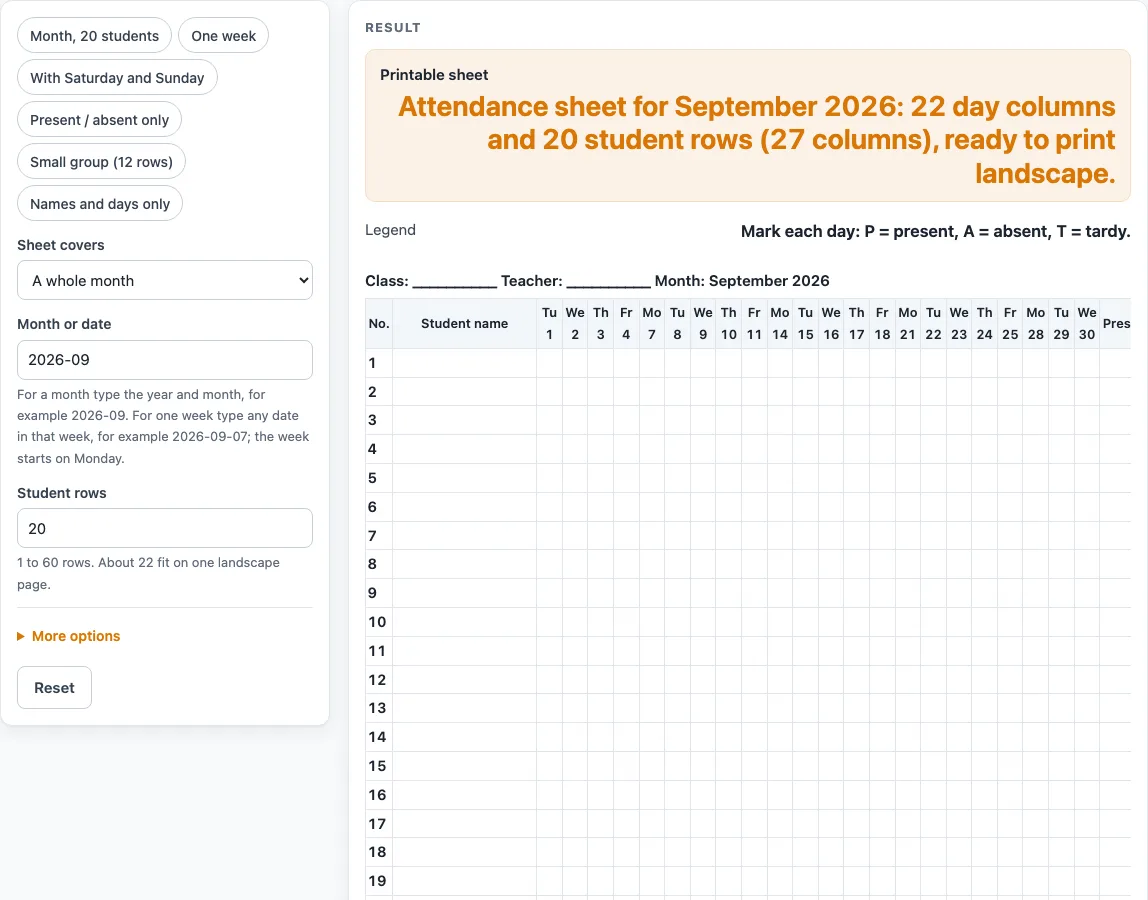
How to use the Attendance Sheet
- Under “Sheet covers”, choose “A whole month” or “One week”.
- Enter the “Month or date”. For a month, type year-month, for example 2026-09. For a week, type any date in that week, for example 2026-09-07.
- Set “Student rows”. Type a number from 1 to 60. The default is 20. More than 60 is cut to 60 with a message.
- Type the “Class or room” and “Teacher” if you want them printed. Empty fields print as blank lines.
- Switch on “Include Saturday and Sunday” only if your days include weekends.
- Choose the extras you need: “Tardy mark (T) and tardy total”, “Totals columns (days present, absent, tardy)”, “Daily total row (students present each day)” and “Number the rows”. All four are on by default.
- Read any message the tool shows. A month must be year-month with a year from 1900 to 2200, a week date must be a real date, and the rows must be a number of at least 1.
- Print the sheet. The page asks your browser for landscape.
To start faster, use a preset: “Month, 20 students”, “One week”, “With Saturday and Sunday”, “Present / absent only”, “Small group (12 rows)” or “Names and days only”. The CSV download button saves the table so you can edit it in a spreadsheet program.
How does a monthly attendance sheet decide which days to show?
In month mode, the tool makes one column for each weekday of the month. Weekends are skipped unless you switch them on, and month lengths follow the calendar, including leap years.
Each day column has the weekday abbreviation over the day of the month, such as Tu over 1. The default sheet is September 2026, with 22 weekday columns running from Tue Sep 1 to Wed Sep 30. Other examples show how the count changes: November 2026 has 21 weekdays and 30 days with weekends, February 2024 has 21 weekdays and 29 days with weekends, and February 2023 has 20 weekdays and 28 days with weekends. February has 29 days in 2024 and 2000, and 28 days in 2023 and 2100.
How does a week attendance sheet pick its dates?
Week mode shows the week that contains the date you enter. Weeks start on Monday, so a Sunday belongs to the week that began the Monday before. A week can run across a month or year end. For example, the date 2026-09-30 is a Wednesday, and it gives the week from Monday Sep 28 to Friday Oct 2, 2026.
What is on the sheet?
The sheet has a “No.” column (optional), a “Student name” column, the day columns, and optional “Present,” “Absent” and “Tardy” total columns. You fill in those totals by hand when the month or week ends. The default sheet has 25 student rows plus one extra row, “Present each day,” which adds a box under every day for the number of students present. That row is switchable. With everything on, the September 2026 sheet has 27 columns in all.
The legend under the sheet reads “Mark each day: P = present, A = absent, T = tardy.” If the tardy switch is off, it reads “Mark each day: P = present, A = absent.” The tool does not decide what counts as tardy or absent. Attendance rules differ by school and state, so set your own rules before you start marking.
How many students fit on one page?
About 22 rows, plus the daily total row, fit on one US Letter landscape page. If you ask for more than 22 rows, the tool warns that the sheet continues on a second page. You can lower the number of rows or print the second page as well. For a small group, the “Small group (12 rows)” preset also turns off the totals columns and the daily total row.
Worked examples
| Input | Result |
|---|---|
| September 2026, 20 rows | 22 day columns, 27 columns in all |
| September 7, 2026, 20 rows | 5 day columns, 10 columns in all |
| February 2024, 20 rows | 29 day columns, 34 columns in all |
| September 2026, 12 rows | 22 day columns, 24 columns in all |
Calculated by the tool above; open it with the same values to see each step.
Frequently asked questions
Can I use this attendance sheet for a month that has weekends?
Yes. Switch on “Include Saturday and Sunday,” and the weekend days appear as columns. With the switch off, a September 2026 sheet has 22 weekday columns.
Why does my sheet say it continues on a second page?
More than 22 rows trigger a warning that the sheet continues on a second page. You can lower the number of rows, or print the second page too.
What format should I use for the month?
Type the month as year-month, for example 2026-09. The year must be between 1900 and 2200. For a week, type any date in that week, such as 2026-09-07.
Does the tool save student names?
No. Student names are written by hand, and the tool has no field for them. Nothing is uploaded.
Does this sheet meet school attendance requirements?
The sheet is a general template. It does not claim to meet any requirement, and attendance rules differ by school and state. Check your local rules before you use the sheet for official records.
Can I get the sheet as a spreadsheet file?
Yes. The CSV button downloads the table, and you can open it in a spreadsheet program.
How many students can I put on the sheet?
Set “Student rows” to any whole number from 1 to 60. The default is 20. If you type more than 60, the tool uses 60 and tells you so.
Related tools
- School and Daycare Admin: see all the forms and sheets for running a class or center.
- Parent Contact Log: use it to record calls and messages with families alongside your attendance records.
- Emergency Contact Form: use it to collect emergency contact details for each child.
- Field Trip Permission Slip: use it when a class leaves the building and families must sign off.
- Daycare Enrollment Form: use it when a new child joins your program.
- Daycare Contract Template: use it to set out the terms that families agree to before care begins.