Behavior Chart
Pick daily, weekly or monthly, type up to 8 expectations and a rating scale, then print a ready behavior chart for kids or your classroom.
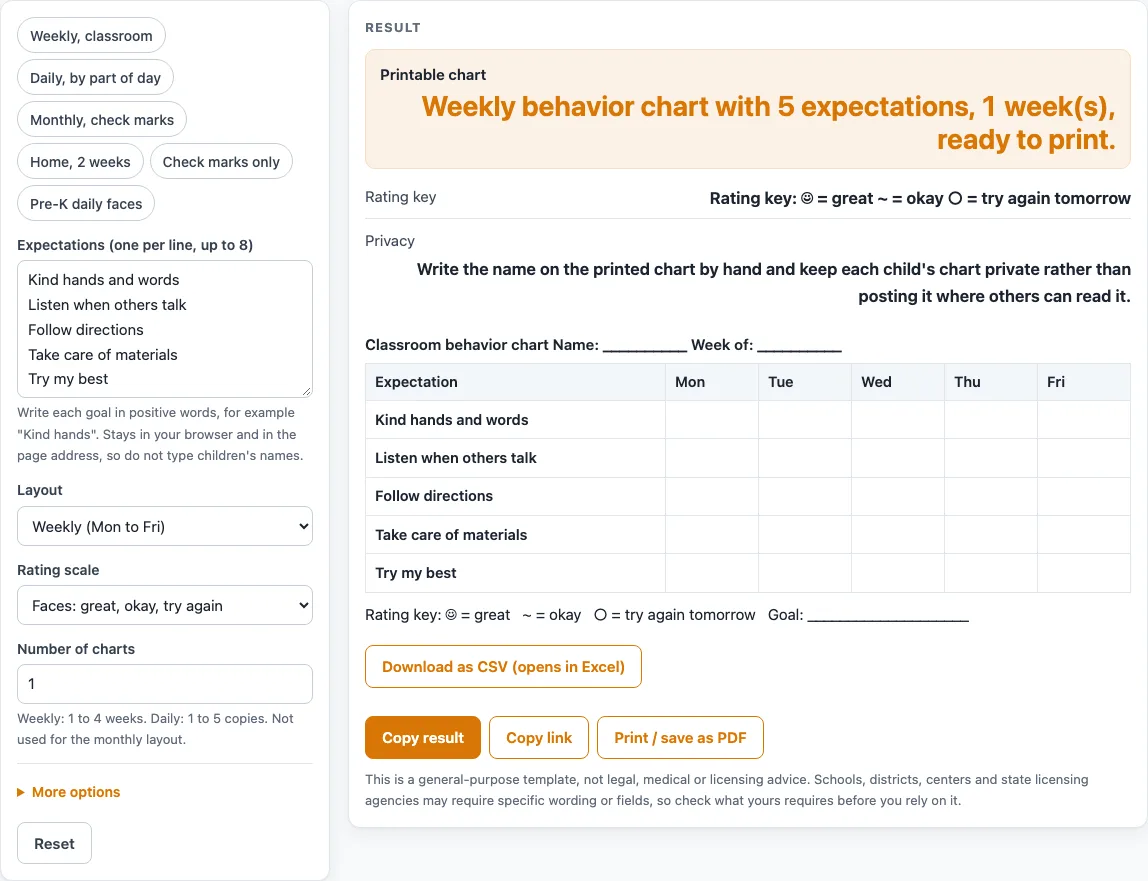
How to use the Behavior Chart
- Choose a “Layout”: “Weekly (Mon to Fri)”, “Daily (by part of the day)” or “Monthly (one row per day)”.
- Type your expectations, one per line, up to 8. The default is 5 lines. Blank lines are ignored, extra lines are cut with a warning, and each line is capped at 60 characters.
- Set “Number of charts”. Weekly allows 1 to 4, each titled “Week n of N”. Daily allows 1 to 5 copies. Monthly is always 1. Larger numbers are cut with a warning, and 0 or text gives an error.
- Pick a “Rating scale”: faces, stars, check mark or blank, numbers 3-2-1, or numbers 4-3-2-1.
- Under the extra settings, you can change the “Chart title”. The default is “Classroom behavior chart”, or “Behavior chart” when “Used at” is set to Home. Other extras are “Include Saturday and Sunday”, “Daily layout: parts of the day” and “Monthly layout: days in the month”.
- Type an optional “Reward goal”. It prints under the chart as “Goal: …”, or as a blank line if you leave it empty.
- To start faster, load a preset: “Weekly, classroom”, “Daily, by part of day”, “Monthly, check marks”, “Home, 2 weeks”, “Check marks only” or “Pre-K daily faces”.
- Look over the table, then print it. Write the child’s name by hand on the “Name: ____” line; the tool has no field for it.
- For a spreadsheet-style file, use the CSV download button.
The default setup is ready to print at once. The monthly layout is formatted to fit 31 rows on one printed page.
What is a behavior chart and how is it laid out?
A behavior chart is a grid that records how often a person meets a set of expectations across days or parts of a day. On this tool’s sheet, the expectations run down the left and the days run across, with an empty box for each mark or sticker.
The weekly layout has an Expectation column followed by Mon-Fri, with Sat and Sun as options. The daily layout lists expectations by Morning, Midday and Afternoon, or by Morning and Afternoon, or by Period 1-4. The monthly layout has one row for each day numbered 1 to 28, 29, 30 or 31, and one column for each expectation.
Each table sits under a heading line. It shows the chart title, then “Name: ____” and “Week of: ____”. On a daily chart the second part reads “Date”, and on a monthly chart it reads “Month”.
Here are two examples. The default input gives 1 table with 6 columns (Expectation, Mon, Tue, Wed, Thu, Fri) and 5 rows. A monthly layout with 4 expectations and 30 days gives 1 table with 5 columns (Day plus 4) and 30 rows.
The name is always written by hand. The page’s privacy note asks you to keep each child’s chart private rather than posting it. That fits a February 2020 Center on PBIS brief, which says clip charts that show each student’s level publicly are inconsistent with PBIS and can be harmful. That brief is about clip charts, but the same care applies to any chart that others can see.
How do the rating scales on a behavior chart work?
Each rating scale gives you a fixed set of symbols to put in a box. The scale you pick applies to the whole sheet. The key prints under the chart as text, so the chart still makes sense in black and white.
The five scales are:
- Faces: ☺ = great, ~ = okay, ○ = try again tomorrow.
- Stars: ★★★ = always, ★★ = most of the time, ★ = sometimes.
- Check mark or blank: ✓ = did it, blank = not yet.
- Numbers 3-2-1: 3 = met the expectation, 2 = working on it, 1 = needs support.
- Numbers 4-3-2-1: 4 = always, 3 = usually, 2 = sometimes, 1 = not yet.
The tool sets up the layout, scale and wording, and you decide what each mark means for your group. The layout and scales are our own design.
Sources (checked 15 October 2026): pbis.org
Worked examples
| Input | Result |
|---|---|
| Weekly (Mon to Fri), 5 expectations | 1 chart(s), 5 rows, 6 columns |
| Daily (by part of the day), 5 expectations | 2 chart(s), 5 rows, 3 columns |
| Monthly (one row per day), 4 expectations | 1 chart(s), 31 rows, 5 columns |
| Weekly (Mon to Fri), 5 expectations | 2 chart(s), 5 rows, 8 columns |
Calculated by the tool above; open it with the same values to see each step.
Frequently asked questions
Is this behavior chart free to use?
Yes. The tool is free and runs in your browser with no sign-up. Nothing is uploaded, so you can print the sheet or use the CSV download button to keep a copy.
Can I use it as a classroom behavior chart and as a behavior chart for kids at home?
Yes. The default title is “Classroom behavior chart”, and setting “Used at” to Home changes it to “Behavior chart”. The “Home, 2 weeks” preset uses stars, Mon-Sun and home expectations.
How many expectations can I add?
You can add up to 8 expectations, one per line. The default is 5. Each line is capped at 60 characters, and extra lines are cut with a warning.
Can I put a child’s name on the chart?
Not in the tool. The “Name: ____” line is printed for you to fill in by hand. Keep the printed chart private.
How do I print a monthly behavior chart on one page?
Choose the “Monthly (one row per day)” layout. It has one row for each day, from 1 to 28-31, and it is formatted to fit 31 rows on one printed page. The monthly layout always makes 1 chart.
Is this chart approved or official?
No. It is a general-purpose template, and the layout and scales are our own design. Your school or program decides how to use it.
Related tools
- ABC Behavior Chart: use it when you want to note what happened before and after a behavior.
- Behavior Clip Chart: use it when you want a clip-based display for a group.
- Behavior Contract Template: use it when you want a written agreement with a set of goals.
- Behavior Log: use it when you want a running record of entries over time.
- Behavior Reflection Sheet (Think Sheet): use it when you want a written reflection after a difficult moment.
- Classroom Jobs Chart: use it when you want to list and rotate classroom jobs.
- Potty Training Chart: use it when you want a simple chart for toilet training steps.
- Reward Chart: use it when you want a chart focused on earning rewards.