Behavior Contract Template
Type the goals, pick elementary, preschool or short wording, and print a contract with space for what the student and teacher will do, a reward and signatures.
How to use the Behavior Contract Template
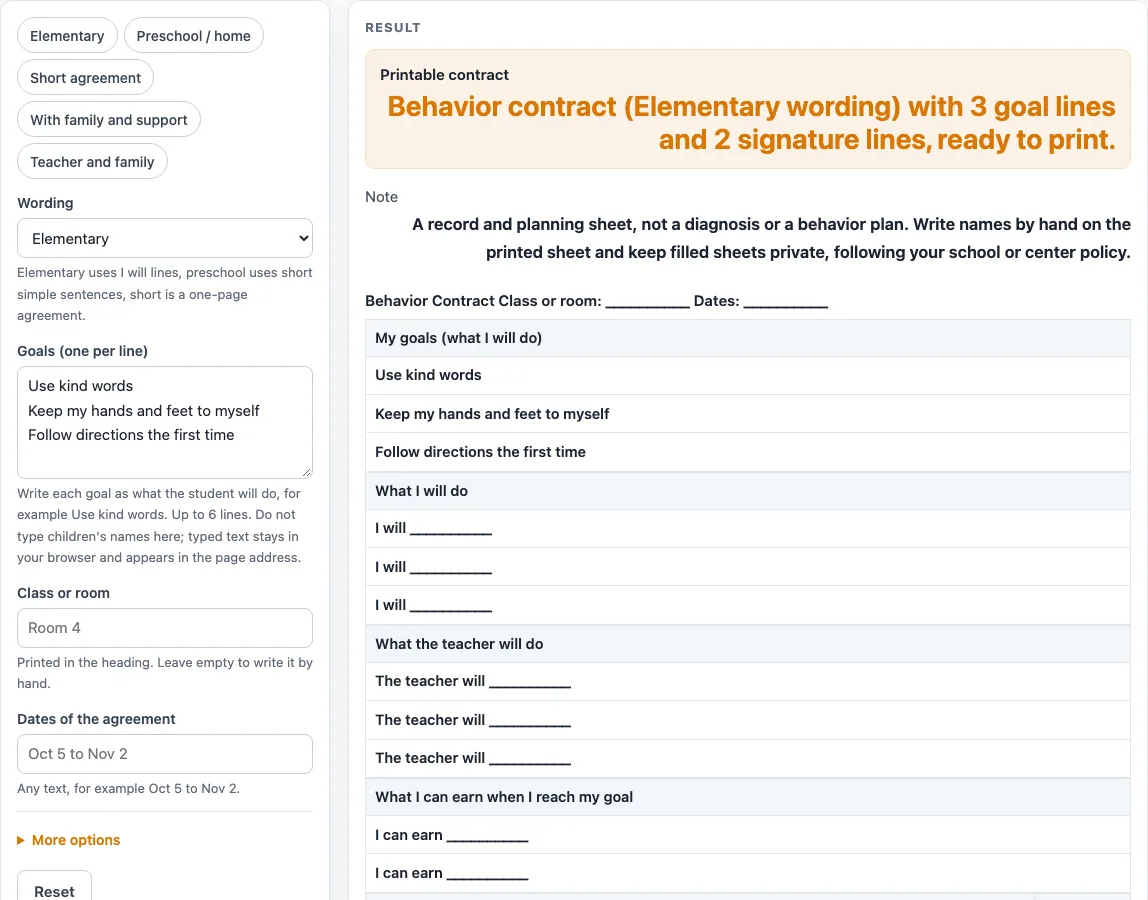
- Choose a “Wording”: “Elementary” (the default, with “I will” lines), “Preschool / home” (“My Promise”, with “I can” lines) or “Short agreement” (headed “Behavior Agreement”). You can also load one of five presets, such as “With family and support”.
- Type your “Goals (one per line)”, up to 6. Extra lines are cut with a warning. The default goals are Use kind words, Keep my hands and feet to myself, and Follow directions the first time. An empty box prints three blank goal lines.
- Read any warning. A goal that starts with don’t, do not, no, not, never, stop or quit gets one. Reword it to say what the student will do.
- Under the extra settings, set the lines for what the student will do, what the teacher will do and the reward. Each is 1 to 8 (defaults 3, 3 and 2). More than 8 is cut with a warning, and 0 or text gives an error.
- Switch sections on or off. Teacher, reward and dates and review are on by default. Turn on the parent or guardian section and signature, or the “If it gets hard” support section (two lines).
- Add a “Class or room” and “Dates of the agreement” if you like. The start date, review date and checking method are blank cells to fill in by hand.
- Print the sheet, or use the CSV download button to save its tables as a .csv file. The default sheet has 6 tables: goals, student, teacher, reward, review and signatures.
What goes into a behavior contract?
A behavior contract is a written agreement that names the behaviors to work on, what each person will do, and what the student can earn. This template is built around public guidance from PENT in California, which says a contract should name the target behaviors in positive terms, the reinforcement that can be earned, and when and under what conditions it is earned, and that the people involved should sign. The layout and wording are our own.
The printed sheet runs in this order: goals, what the student will do, what the teacher will do, an optional family section, what the student can earn, optional support lines, a table for the start date, review date and how progress will be checked, then the signature table.
Why should goals say what to do?
A goal that says what the student will do is easier to read than a list of things to avoid. The tool checks the start of each goal. If it begins with don’t, do not, no, not, never, stop or quit, you get a warning asking for wording that says what the student will do instead. For example, “Don’t run” could become “Walk in the hallway.” The check only looks at the opening word, so read each goal yourself as well.
How does the reward part of a behavior contract work?
The reward section lists what the student can earn, written as “I can earn __________” lines in the elementary wording. Enter only rewards the student, teacher and family have agreed on, and keep the count between 1 and 8 lines (the default is 2). The tool prints the words you type. It does not choose rewards for you. The review table below leaves blank cells for the start date, the review date and how you will check the goals.
Who signs a behavior contract?
The signature table always has Student and Teacher rows, and each row has a signature cell and a date cell. When the parent or guardian section is on, a “Parent or guardian” row is added. In the “Preschool / home” wording, the student row reads “Child’s mark or name”. Because the tool has no name field, write names and signatures by hand on the printed copy.
Is a behavior contract template an official form?
No. This is a general-purpose template and a sample agreement. Check what your school, district, center or state agency requires before you use a behavior contract in a classroom or program.
Sources (checked 15 October 2026): pent.ca.gov
Worked examples
| Input | Result |
|---|---|
| Elementary wording | 3 goals, 2 signature lines |
| Preschool / home wording | 3 goals, 3 signature lines |
| Short agreement wording | 2 goals, 2 signature lines |
| Elementary wording | 3 goals, 3 signature lines |
Calculated by the tool above; open it with the same values to see each step.
Frequently asked questions
Do I need to type a child’s name into the tool?
No. The tool has no name field. Write names and signatures by hand on the printed sheet.
How many goals can I add?
You can add up to 6 goals, one per line. Extra lines are cut with a warning. The default is three goals, and an empty box prints three blank goal lines.
What are the presets?
The presets are Elementary, Preschool / home, Short agreement, With family and support, and Teacher and family. Preschool / home uses short sentences, “I can” lines, a child’s-mark signature, the goals Use gentle hands, Use walking feet and Listen with my ears, 2 lines per section, and the parent section on. Short agreement has 2 goals, 1 line per section and no review table. With family and support turns on the parent section and the support section. Teacher and family turns on the parent section and uses 4 teacher lines.
Can I keep my sheet as a file?
The CSV download button saves the sheet’s tables as a .csv file made in your browser. Use the printed sheet for the finished copy that people sign.
Does the tool keep what I type?
Nothing is uploaded. Typed text stays in your browser and appears in the page address, so do not type children’s names into the goals or heading.
Related tools
- Behavior Chart: use it to track a student’s daily behavior on a simple grid.
- ABC Behavior Chart: use it to record what happened before and after a behavior.
- Behavior Clip Chart: use it for a ladder of levels with a clip spot beside each one.
- Behavior Log: use it to keep a running table of behavior entries.
- Behavior Reflection Sheet (Think Sheet): use it when a student needs to think through a behavior after it happens.
- Classroom Jobs Chart: use it to assign and rotate classroom jobs.
- Potty Training Chart: use it for a simple grid to follow toileting progress.
- Reward Chart: use it to record points or stickers earned toward a reward.