Behavior Log
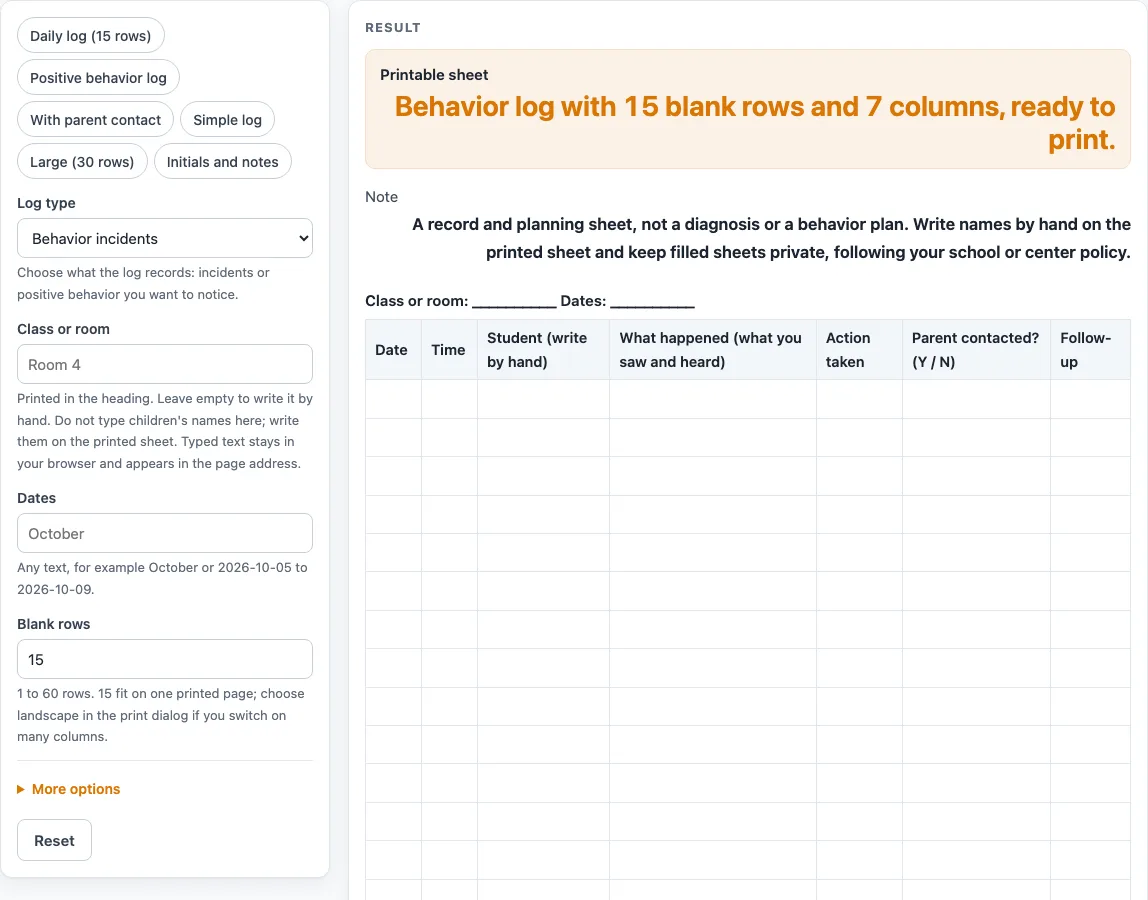
Switch columns on or off, choose incident or positive-behavior wording and the number of rows, then print the blank log or download it as a CSV.
How to use the Behavior Log
- Under “Log type”, choose “Behavior incidents” (the default) or “Positive behavior”.
- Type the “Class or room” and the “Dates” into the text boxes. Empty boxes print as blank lines.
- Set “Blank rows” to a number from 1 to 60. The default is 15. A number above 60 is cut to 60 with a warning. A 0, a negative number or text gives an error.
- Under the extra settings, switch the columns on or off. The default sheet has seven columns: Date, Time, Student, What happened, Action taken, Parent contacted? (Y / N), and Follow-up. “Number the rows”, “Setting or activity column”, “Staff initials column” and “Notes column” are off by default.
- If you want a starting point, pick a preset: “Daily log (15 rows)”, “Positive behavior log”, “With parent contact”, “Simple log”, “Large (30 rows)” or “Initials and notes”.
- Watch for the warning. More than 8 columns triggers a message that they will print small. Switch some columns off, or choose landscape in the print dialog.
- Check the preview, then print it. The print view shows the heading and a bordered table in black and white.
- Use the CSV download button if you want the heading, column names and blank rows in a spreadsheet file.
Write names by hand on the printed sheet. The page has no name field, so the Student column is left empty for you to fill in with a pen.
What is a behavior log used for?
A behavior log is a written record of what happened in a classroom or group setting and, where the sheet has the column, what was done about it. This tool only makes the blank sheet. It does not decide what a behavior means or what should happen next.
What is the difference between the two log types?
The “Behavior incidents” type has the columns “What happened (what you saw and heard)” and “Action taken”. The “Positive behavior” type has “Positive behavior seen” and “Praise or recognition given”. Use the type that matches the record you need, or load a preset that suits your setting. The “Positive behavior log” preset switches to the positive wording and turns off the parent and follow-up columns.
What should go in the “What happened” column?
The column name asks you to record what you saw and heard. The page does not tell you what to write or what to leave out. Your school or program’s own procedures should guide the wording you use.
How do the columns fit on one page?
Every column you add makes the others narrower. The tool warns when you turn on more than 8 columns, because they will print small. The default sheet has 7, and the “Initials and notes” preset has exactly 8. If you see the warning, switch off a column such as Time, or choose landscape in the print dialog. The “Parent contacted? (Y / N)” column is a short yes or no box.
How many rows should I print?
The default is 15 blank rows, and the page notes that about 15 fit on one printed page. The “Large (30 rows)” preset doubles that. You can ask for up to 60 rows.
Does the sheet meet school or licensing rules?
This is a general-purpose template, and it is not legal, medical or licensing advice. Check what your school, district, center or state agency requires before you use the sheet. The tool does not claim that its sheet meets any particular rule.
Where does my information go?
Everything runs in your browser and nothing is uploaded. Typed header text stays in the browser and appears in the page address (?s=). Because the sheet has no name field, keep student names off the page and write them by hand on the printed copy.
Worked examples
| Input | Result |
|---|---|
| 15 rows | 15 rows, 7 columns |
| 15 rows | 15 rows, 5 columns |
| 15 rows | 15 rows, 4 columns |
| 25 rows | 25 rows, 8 columns |
Calculated by the tool above; open it with the same values to see each step.
Frequently asked questions
Is this a diagnosis or a behavior plan?
No. The sheet is a blank record form. It does not diagnose anything and does not create a plan for a student.
Can I type a student’s name into the page?
The tool has no name field, so you do not need to type names into it. Write names by hand on the printed sheet.
Is my data kept anywhere?
Nothing is uploaded. Typed header text stays in your browser and appears in the page address, so keep names out of the “Class or room” and “Dates” boxes.
Why does my sheet print small?
More than 8 columns triggers a warning that they print small. Switch some columns off or choose landscape in the print dialog.
Can I get the log as a spreadsheet file?
Yes. The CSV download button saves the heading, column names and blank rows as a .csv file made in your browser.
Is this legal advice?
No. It is a general-purpose template and not legal, medical or licensing advice. Check what your school, district, center or state agency requires.
How many rows can the log have?
Set “Blank rows” from 1 to 60. The default is 15, and the “Large (30 rows)” preset uses 30. Above 60 the sheet uses 60 and shows a warning.
Related tools
- ABC Behavior Chart: use it to note the antecedent, behavior and consequence for each event.
- Behavior Chart: use it to track behavior across a day or week on a simple grid.
- Behavior Clip Chart: use it for a printable ladder of levels with a clip spot beside each one.
- Behavior Contract Template: use it to write out an agreement between a teacher, student and family.
- Behavior Reflection Sheet (Think Sheet): use it when a student needs a written reflection after a behavior event.
- Classroom Jobs Chart: use it to list classroom jobs and who is responsible for each one.
- Potty Training Chart: use it to follow toileting progress for a child at home or in child care.
- Reward Chart: use it to track stickers or points toward a reward.