Behavior Reflection Sheet (Think Sheet)
Choose the grade level and the questions, then print a think sheet where students write what happened, how they felt and what they will do next time.
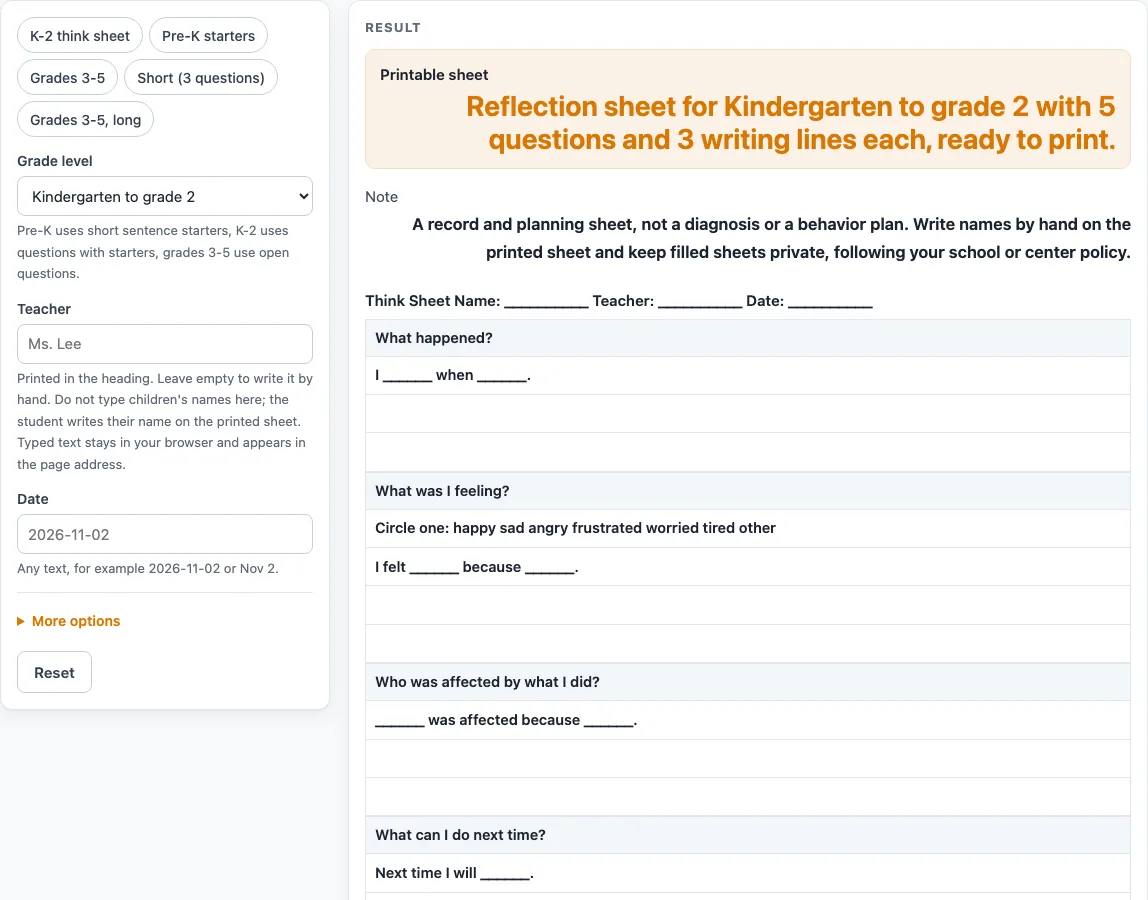
How to use the Behavior Reflection Sheet
- Open “Grade level” and choose “Pre-K”, “Kindergarten to grade 2” or “Grades 3 to 5”. Kindergarten to grade 2 is the default and uses the heading Think Sheet.
- If you want a ready setup, pick a preset: “K-2 think sheet”, “Pre-K starters”, “Grades 3-5”, “Short (3 questions)” or “Grades 3-5, long”.
- Type the “Teacher” and “Date” into the form, or leave them blank for handwriting.
- Under the extra settings, turn questions on or off: “What happened”, “Feelings”, “Who was affected”, “Other choices” (off by default), “Next time” and “Making it right”.
- Set “Writing lines per question” from 1 to 8. The default is 3, the Pre-K preset uses 2, and the Grades 3-5 preset uses 4.
- Decide on “Adult note and signatures”. It adds an Adult note box with 2 blank lines and a signature table for Student and Teacher or adult. Keep it or switch it off.
- Keep at least one question or the adult block on. If both are off, the tool shows an error asking you to switch one on.
- Print the sheet. It prints in black and white and does not rely on color or pictures.
The heading always prints “Name: __________” so the student can write their own name by hand. Do not type a child’s name into the page. Any typed header text stays in your browser and shows in the page address after ?s=.
What is a behavior reflection sheet for?
A behavior reflection sheet gives a student a structured way to think about a behavior incident after it happens. It asks the student to describe the event, name the feeling, and consider who was affected. It then asks what they could do next time and how they could make things right. The form is a recording sheet: the student writes the reflection on paper. It does not decide the cause of a behavior, and it is not a diagnosis or a behavior plan.
The sheet works in the same way across levels, but the language changes. Pre-K uses sentence starters such as “I felt ______.” so young children can complete a sentence by filling in one word. Kindergarten to grade 2 uses questions with starters such as “I ______ when ______.” Grades 3 to 5 uses open questions with no starters, which asks the student to write full thoughts in their own words. The heading also changes, from My Thinking Sheet in Pre-K, to Think Sheet in Kindergarten to grade 2, to Behavior Reflection in Grades 3 to 5.
What questions go on a think sheet?
A think sheet is the same kind of reflection form, often called by this name in classrooms. The default Kindergarten to grade 2 sheet has five question boxes: what happened, feelings, who was affected, what to do next time, and how to make it right. The feelings box includes a line of feeling words to circle. These are plain text with no pictures. Pre-K lists happy, sad, mad, scared, tired, and other. Kindergarten to grade 2 and Grades 3 to 5 list longer sets, such as frustrated and worried.
The “Grades 3-5” preset adds a question about what other choices the student had. You can also switch that question on at any level with “Other choices”. Each question can be switched on or off, so you can build a shorter sheet for a quick check-in or a fuller one for a longer conversation. The “Pre-K starters” preset keeps three questions with 2 lines each, and “Short (3 questions)” keeps three questions and drops the adult block.
How much writing space is there?
“Writing lines per question” controls how much space each question gets. In Pre-K and Kindergarten to grade 2, the first line of each box holds the sentence starter, and the rest are blank lines. The feelings box also has its line of words to circle.
The adult block at the end is optional. It adds an Adult note box and a signature table, with signature and date cells for the student and the teacher or adult.
The tool is a general-purpose template, not legal, medical, or licensing advice. Check what your school, district, center, or state agency requires before you use a sheet in an official setting.
Worked examples
| Input | Result |
|---|---|
| Kindergarten to grade 2 | 5 questions, 3 lines each |
| Pre-K | 3 questions, 2 lines each |
| Grades 3 to 5 | 6 questions, 4 lines each |
| Kindergarten to grade 2 | 3 questions, 2 lines each |
Calculated by the tool above; open it with the same values to see each step.
Frequently asked questions
Is this tool free to use?
Yes. The tool runs in your browser, and there is no sign-up. Nothing you enter is uploaded.
Can I type a student’s name into the sheet?
No. The sheet has no name field. The heading prints “Name: __________” so the student can write their name by hand on the printed copy. Please do not type a child’s name into the page.
Which level should I choose?
Choose the level that matches the age and reading ability of your students. Pre-K uses sentence starters and short feeling words. Kindergarten to grade 2 uses starters in questions. Grades 3 to 5 uses open questions with no starters.
What is the line of words to circle?
The feelings question includes a line of feeling words to circle. The words are plain text, with no pictures, so the sheet prints clearly in black and white.
What happens if I switch off every question?
The tool shows an error asking you to switch on at least one question or the adult note. You can turn off the adult block and keep one or more questions, or keep the adult block on by itself.
Does the sheet need a signature?
The sheet includes an optional Adult note box and signature table for the student and a teacher or adult. Whether a signature is needed depends on your setting, so check the rules your school, district, center, or state agency follows.
Related tools
- ABC Behavior Chart: use it to record what came before a behavior, the behavior itself, and what followed it.
- Behavior Chart: use it to track behavior across the day or week on a grid.
- Behavior Clip Chart: use it for a printable ladder of levels with a clip spot beside each one.
- Behavior Contract Template: use it to draft a written agreement between a student, a teacher and, if you like, a parent.
- Behavior Log: use it to keep a running table of behavior entries.
- Classroom Jobs Chart: use it to list and rotate classroom helper roles.
- Potty Training Chart: use it to follow bathroom routines for a young child.
- Reward Chart: use it to track completed tasks and earned rewards.