Classroom Rules Poster
Type up to 10 rules, choose numbers or bullets, add optional "we agree" signature lines and print a classroom rules poster in large type.
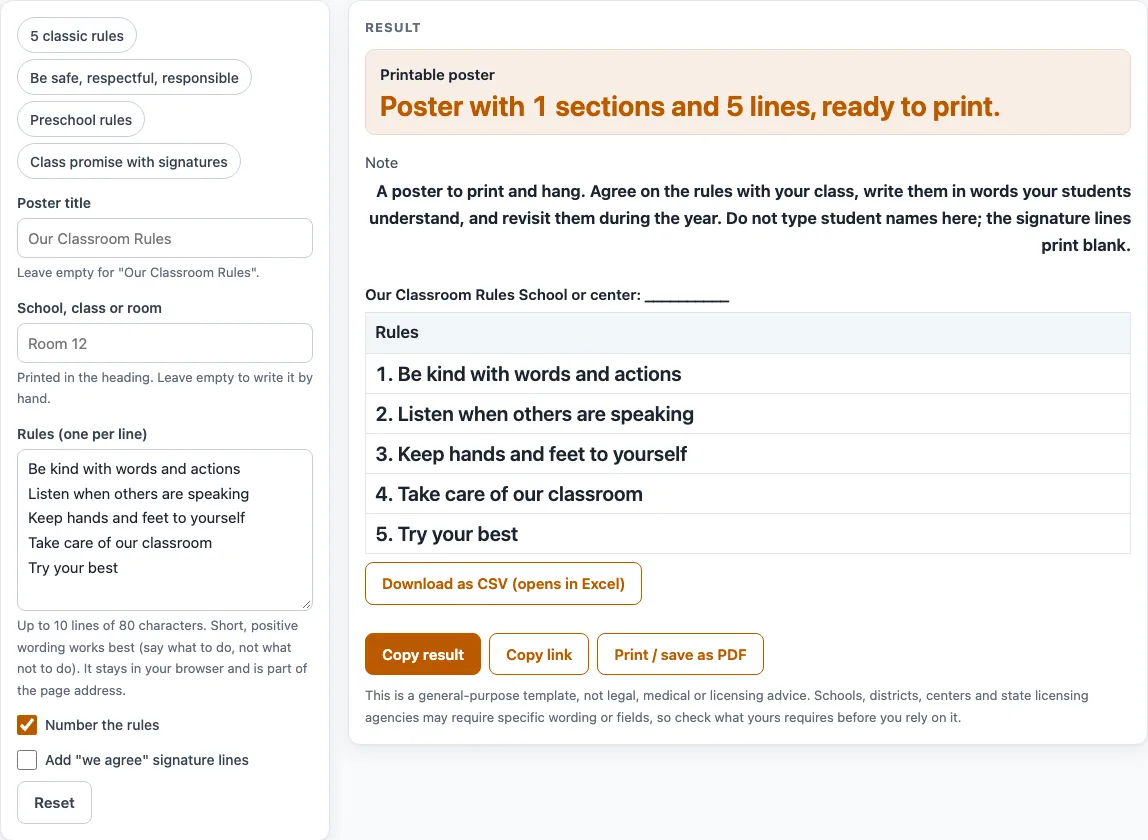
The Classroom Rules Poster is a free tool that builds a printable poster of your class rules. You type your rules, add a title and your school, class or room name, and print a page with large, easy-to-read type. It runs in your browser with no sign-up, and nothing you type is uploaded.
You can start from one of four presets or edit the five opening rules. The poster is laid out for one page, so the rules can be read from across the room. Use it for a wall poster, a smaller copy for each desk, or a class promise that students sign.
How to use the Classroom Rules Poster
- Type a title in Poster title. If you leave it empty, the poster reads “Our Classroom Rules.”
- Type your school, class or room name in School, class or room. It prints in the heading.
- Edit the rules in Rules (one per line). Use up to 10 rules, each up to 80 characters.
- Turn on Number the rules if you want numbers. If it is off, each rule gets a bullet.
- Turn on Add “we agree” signature lines, then set Signature lines from 1 to 20.
- Read any warnings. More than 5 rules shows “N rules is a lot for a poster,” and rules that start with don’t, no, not, never or stop get a hint to say what to do instead.
- Print the page with Print / save as PDF. The rules print in large type, 24 point, with a centered title, and the whole poster fits on one page. For a smaller copy for each desk, print it scaled down, and write names on the signature lines by hand.
To start faster, pick a preset: 5 classic rules, Be safe respectful responsible, Preschool rules, or Class promise with signatures. The CSV button downloads your text as a spreadsheet file.
How many classroom rules should I have?
Most classroom rules posters work best with three to five rules. The tool warns when you go above five, because a long list is hard to read at a glance, even though it accepts up to 10.
Minnesota’s law on schoolwide behavior asks schools to teach and practice “three to five positively stated” expectations. That is one state’s requirement for school-wide expectations, not a rule for every classroom, but it shows a common target. Short lists are also easier for students to remember and for you to point to when a reminder is needed.
How do I word classroom rules positively?
Write each rule as what to do, not what to avoid. “Walk inside” tells a student the action, while “Don’t run” only names the thing to stop. The tool checks the first word of each rule, so it flags any rule that starts with don’t, no, not, never or stop and suggests wording that says what to do.
Good examples include “Listen when others are speaking” and “Keep hands and feet to yourself.” The first-word check cannot catch every negative, so read each rule and ask whether it tells students what to do.
Three-part sets such as Be Safe, Be Respectful and Be Responsible are common in school materials. The preset “Be safe, respectful, responsible” uses the same three-part idea.
The Class promise preset shows a different style: four statements that start with We, such as We take turns, followed by eight blank signature lines. Because the lines print blank, students write their own names by hand and the tool never holds them. The tool does not choose your rules. Pick them yourself, ideally with your class, and post the poster where students can read it. Edit the wording so it fits the age group you teach.
Sources (checked 18 October 2026): revisor.mn.gov
Worked examples
| Input | Result |
|---|---|
| 5 rules | 1 sections, 5 lines |
| 3 rules | 1 sections, 3 lines |
| 4 rules | 2 sections, 12 lines |
Calculated by the tool above; open it with the same values to see each step.
Frequently asked questions
What are good classroom rules for kindergarten?
The Preschool rules preset gives five short rules: Use gentle hands, Use kind words, Listen with your ears, Walk inside and Help clean up. Each one names an action students can do. Change the wording to match your group.
Can I print the poster in large type?
Yes. The printed rules use 24 point type with a centered title, and the whole poster fits on one page. For a smaller copy for each desk, print the page scaled down.
Can students sign the poster?
Yes. Turn on “Add ‘we agree’ signature lines” and choose between 1 and 20 lines. The lines print blank so students can write their own names, so do not type student names into the tool.
Can I sell or share the poster I make?
Yes. The printed sheet is yours to use, including in classroom materials you sell or share on sites such as TpT, Etsy or KDP. No credit is needed.
Does the tool decide my classroom rules?
No. You choose the rules, ideally with your class. The tool only lays out the text you enter.
Is anything I type saved or uploaded?
Nothing is uploaded. Typed rules stay in your browser and become part of the page address when you share the link, so anyone with that link can see them.
Related tools
- Behavior Chart for tracking how each student is doing against your expectations.
- Reward Chart when you want students to earn stickers or points for following the rules.
- Classroom Jobs Chart for assigning helper roles that go with your routines.
- Behavior Contract Template when one student needs a written plan with specific goals.
- Behavior Reflection Sheet for having a student think about what happened and what to do next time.
- Behavior and reward charts to compare the chart options in one place.