Daily Lesson Plan Template
List your blocks and how long each one lasts, and the plan works out every start and end time, with room to write goals, materials and notes before you print.
A daily lesson plan template is a printable, time-blocked sheet that lists each part of the school day with a start time, an end time and an activity name. This Daily Lesson Plan Template builds one for you. Enter a start time and your blocks, and the page calculates each block’s start and end time, then shows a table with empty columns to write in.
It runs in your browser, it is free, and there is no sign-up. Nothing you type is uploaded. You can change the block names, lengths and columns to fit your class, then print the sheet or save the tables as a CSV file for a spreadsheet.
How to use the Daily Lesson Plan Template
- Type your day’s start time in the “Start time” box, for example 8:30 AM, 8:30 or 13:15.
- Enter your blocks in “Blocks (one per line)”. Write a name, then add a comma and the minutes if you want a set length, for example “Reading, 45”. Use up to 16 blocks.
- Choose a “Default block length (minutes)”: 15, 20, 30, 45 or 60. Lines without minutes use this length.
- Pick a 12-hour or 24-hour “Clock”.
- Set “Writing lines per block” (1 to 3; the default is 2) to leave room to write under each time.
- Type the “Teacher”, “Class” and “Date” if you want them in the heading. They are printed at the top of the sheet.
- Turn the checkboxes on or off: “Today’s objective row”, “Reminders row”, and the “Learning goal column”, “Materials column” and “Notes column”.
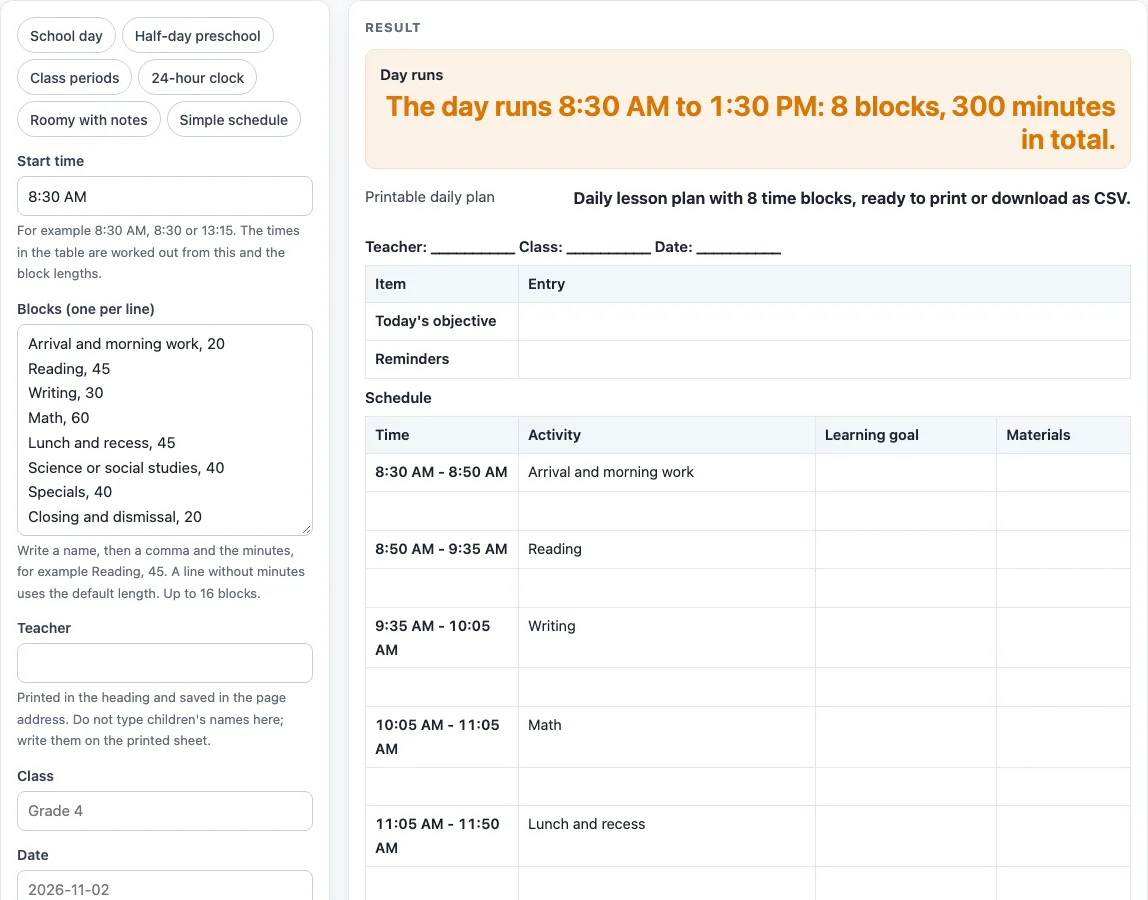
- Read the “Day runs” result. It states the start, end, number of blocks and total minutes, for example 8:30 AM to 1:30 PM for the default day.
- Check the calculation steps, which show each block as start + minutes = end.
You can start from a preset: “School day”, “Half-day preschool”, “Class periods”, “24-hour clock”, “Roomy with notes” or “Simple schedule” (Time and Activity only). Print the page to get the heading and bordered tables, or use the CSV button to save the tables.
How does a daily lesson plan template calculate block times?
Each block’s end time is its start time plus its length in minutes. The page starts with your start time, adds the first block’s minutes to get its end time, then uses that end time as the start of the next block. The calculation steps show this for every row, such as 8:30 AM + 20 min = 8:50 AM.
What does the default school day look like?
The default day starts at 8:30 AM. It has eight blocks: Arrival and morning work (20 minutes), Reading (45), Writing (30), Math (60), Lunch and recess (45), Science or social studies (40), Specials (40) and Closing and dismissal (20). These add up to 300 minutes, so the day runs from 8:30 AM to 1:30 PM. The block times are 8:30 AM to 8:50 AM, 8:50 AM to 9:35 AM, 9:35 AM to 10:05 AM, 10:05 AM to 11:05 AM, 11:05 AM to 11:50 AM, 11:50 AM to 12:30 PM, 12:30 PM to 1:10 PM and 1:10 PM to 1:30 PM.
Why does the total length of the day matter?
The total is the sum of all block lengths, and the end time follows from it. If you add or lengthen a block, the day ends later. The page returns an error if a start time is not a clock time, if a block length is 0 or over 480 minutes, if the list is empty, or if the day would run past midnight. A plan that ends exactly at midnight is allowed. If you enter more than 16 blocks, the list is cut to 16 and a warning appears.
What columns should a daily lesson plan template include?
The default columns are Time, Activity, Learning goal and Materials. Notes is off by default, and you can turn it on. The first small table holds the Today’s objective and Reminders rows, which you can also switch off. The page does not suggest how long any subject should take. The block names and lengths are yours to set.
Do I need to check school or licensing rules for my plan?
This is a general-purpose template. It does not give legal, medical or licensing advice. Check what your school, district, center or state licensing agency requires before you use a printed plan. Your typed text stays in the page address, and the page has no field for a child’s name, so do not type one in.
Worked examples
| Input | Result |
|---|---|
| Start 8:30 AM, 8 blocks | 18 rows, 4 columns |
| Start 8:00 AM, 7 blocks | 16 rows, 4 columns |
| Start 8:15 AM, 7 blocks | 16 rows, 4 columns |
| Start 08:30, 8 blocks | 18 rows, 4 columns |
Calculated by the tool above; open it with the same values to see each step.
Frequently asked questions
Is the Daily Lesson Plan Template free?
Yes. It is free to use, and there is no sign-up. It runs in your browser.
Does the page save my plan?
No. Nothing is uploaded. Your teacher, class, date and other settings are kept in the page address, so the same settings come back when you open that address.
Can I use 24-hour times?
Yes. Choose the 24-hour clock, or start from the “24-hour clock” preset. You can also enter a start time such as 13:15.
How many blocks can I add?
You can add up to 16 blocks. If you enter more, the list is cut to 16 and a warning is shown.
Can I print the plan or save it to a spreadsheet?
You can print it. The print view shows the heading and bordered tables. The CSV button saves the tables as a .csv file that you can open in a spreadsheet program.
Why does my plan show an error?
The page reports an error if the start time is not a clock time, a block length is 0 or over 480 minutes, the list is empty, or the day would run past midnight. Fix the line it points to and the result will update.
Does the page tell me how long each subject should take?
No. The block names and lengths are yours. The default day is only a starting point you can change.
Related tools
- Kindergarten Lesson Plan Template: Use it when you want a lesson plan layout set up for kindergarten classes.
- Lesson Plan Template: Use it for a general lesson plan layout that is not tied to one day’s time blocks.
- Preschool Lesson Plan Template: Use it when you plan lessons for a preschool group.
- Preschool Schedule: Use it to lay out a preschool day’s routine.
- Preschool Visual Schedule: Use it to build a picture-style schedule for a preschool room.
- Teacher Lesson Plan Book: Use it to keep plans together across a term.
- Weekly Lesson Plan Template: Use it when you want to plan a full week instead of a single day.