Daycare Contract Template
Type your own fees and hours, choose the sample clauses, then print a daycare contract with signature lines. The wording is a sample for you to review.
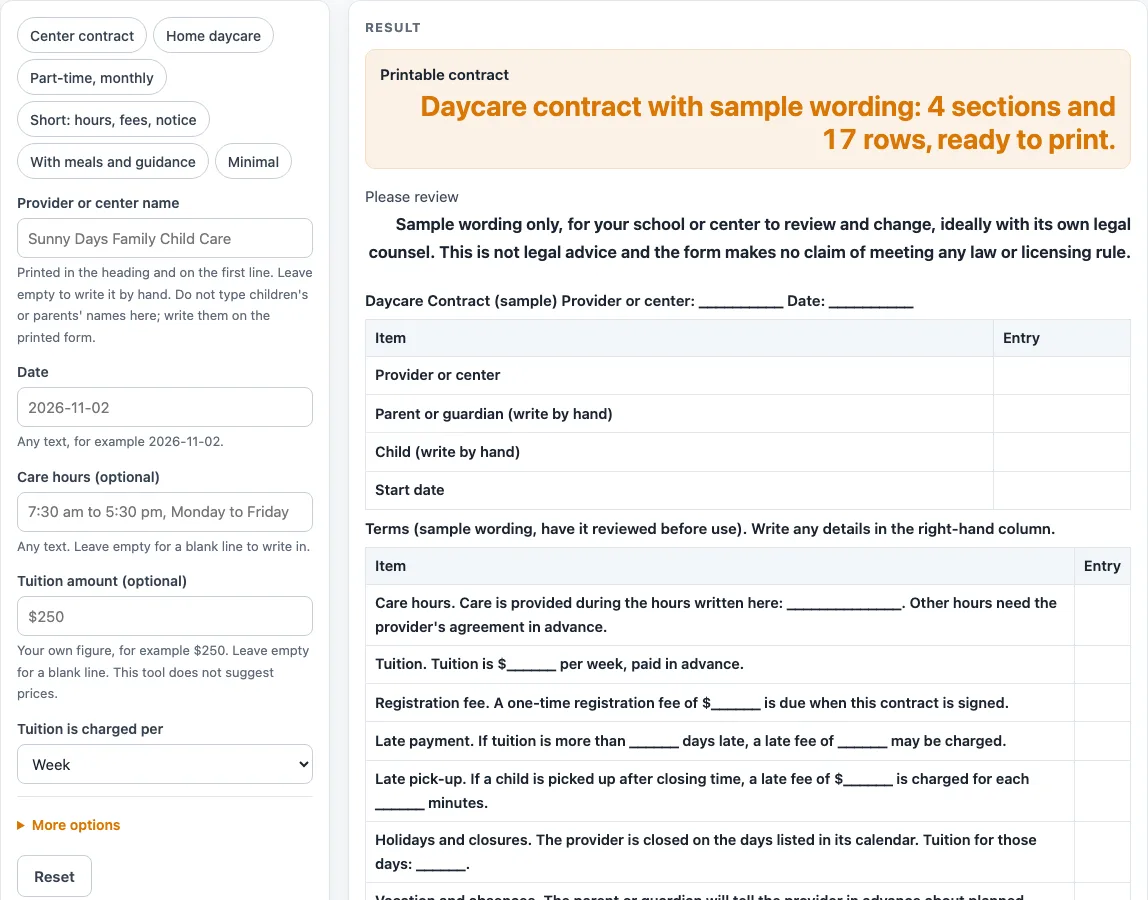
How to use the Daycare Contract Template
- Pick a preset: “Center contract”, “Home daycare”, “Part-time, monthly”, “Short: hours, fees, notice”, “With meals and guidance” or “Minimal”. The default has 4 sections and 17 rows.
- Type your name in “Provider or center name”, then fill in “Date” and, under the extra settings, “Start date (optional)”.
- Enter your hours in “Care hours (optional)”.
- Enter “Tuition amount (optional)” and choose Week or Month in “Tuition is charged per”. Typed money prints exactly as you type it.
- Enter “Registration fee (optional)” and “Late pick-up fee (optional)” if you charge them. An empty fee prints $______ so you can write the amount by hand.
- Set “Notice to end care (days)” from 1 to 90. The default is 14. Values above 90 are cut to 90 with a warning, and 0 or text gives an error.
- Use the checkbox for each clause to turn it on or off. Meals and guidance are off by default; the other ten clauses are on.
- Add anything extra in “Extra terms or notes (optional)”, one line per sentence.
- In the right-hand “Entry” column of each clause row, write any extra details by hand. Leave the parent, guardian and child lines blank and fill them in by hand.
When the sheet looks right, print the page; the print view shows only the heading and the bordered tables. You can also choose “Download as CSV” to save the tables as a .csv file. The file is made in your browser and nothing is uploaded.
What goes in a daycare contract?
A daycare contract usually covers who is involved, when care starts, what hours are offered, what tuition and fees apply, and how care can end. This template follows that pattern in four sections: parties, terms, a copies sentence and signature rows. The layout and wording are our own design, based on common practice, and no outside form was copied.
What is a daycare contract template, and how is it different from a finished contract?
A daycare contract template is a starting point with blank lines and sample sentences. A finished contract has the real names, amounts and dates filled in and agreed by both sides. This tool gives you the structure. You decide the numbers and the final wording, and the page asks you to have the sheet reviewed before use.
Why do fee and payment sentences leave blanks?
The tool never suggests or calculates a price, so it cannot fill in a fair rate for you. If you type a tuition amount, it is printed exactly as typed. For example, a fee of $250 with “per month” reads “Tuition is $250 per month, paid in advance.” If you leave the amount empty, the sentence prints “Tuition is $______ per week, paid in advance.”
Late payment, holidays, absences and meals sentences end in blank lines. The tool states no number of days or amount for them. You write those terms yourself in the right-hand column or on the lines.
How does the notice period work when care ends?
The ending-care sentence uses your “Notice in days” value. With the default of 14, it reads “Either side may end this contract by giving 14 days’ written notice.” Choose a number that suits your setting, within the 1 to 90 limit. The tool will not accept 0 or text, and it cuts any value above 90 down to 90 with a warning.
Why does the sample wording need a review before use?
The clause sentences are neutral examples that we wrote, and the title marks the sheet as (sample). The page does not say the contract is enforceable or meets any law or licensing rule, and it contains no state-specific terms. Read every sentence, change anything that does not match your setting, and have the final version reviewed by a qualified person before anyone signs it.
Worked examples
| Input | Result |
|---|---|
| 17 rows | 4 sections, 17 rows |
| 19 rows | 4 sections, 19 rows |
| 15 rows | 4 sections, 15 rows |
| 10 rows | 4 sections, 10 rows |
| 20 rows | 5 sections, 20 rows |
Calculated by the tool above; open it with the same values to see each step.
Frequently asked questions
Is this daycare contract legally binding?
The page does not say the contract is enforceable or meets any law or licensing rule. Treat the output as a draft. Have the final version reviewed by a qualified person before use.
Does the tool suggest a tuition price?
No. The tool never suggests or computes a price. Type the amount you have chosen, or leave the field empty to print $______.
Can I type a child’s or parent’s name into the tool?
There is no input for names or any personal detail. The name lines print blank, so write them in by hand after you print.
What happens if I enter 0 or a number above 90 for notice?
Zero or text in “Notice in days” gives an error. A value above 90 is cut to 90, and a warning appears.
Can I use this template for a home daycare?
Yes. Choose the “Home daycare” preset, which turns on the meals and guidance clauses and fills in sample care hours. You can still switch any clause on or off.
Is anything I type saved or uploaded?
Everything runs in your browser. Header text and optional note lines stay in the browser and are written into the page address. Downloading the CSV creates the file in your browser, and nothing is uploaded.
Related tools
- Attendance Sheet: use it to record daily attendance for the children in your care.
- Daycare Cost Calculator: use it to work out costs from the numbers you enter.
- Daycare Enrollment Form: use it when you need a form to collect enrollment details.
- Emergency Contact Form: use it to list who should be contacted in an emergency.
- Field Trip Permission Slip: use it when you need a permission slip for an outing.
- Media Release Form (Sample): use it as a sample when you want permission to use photos or recordings.
- Nanny Cost vs Daycare Calculator: use it to compare costs from the numbers you enter for each option.
- Parent Contact Log: use it to record conversations and messages with families.