Daycare Enrollment Form
Pick enrollment, registration or application, choose the sections you need, then print a blank daycare form or download it as a CSV.
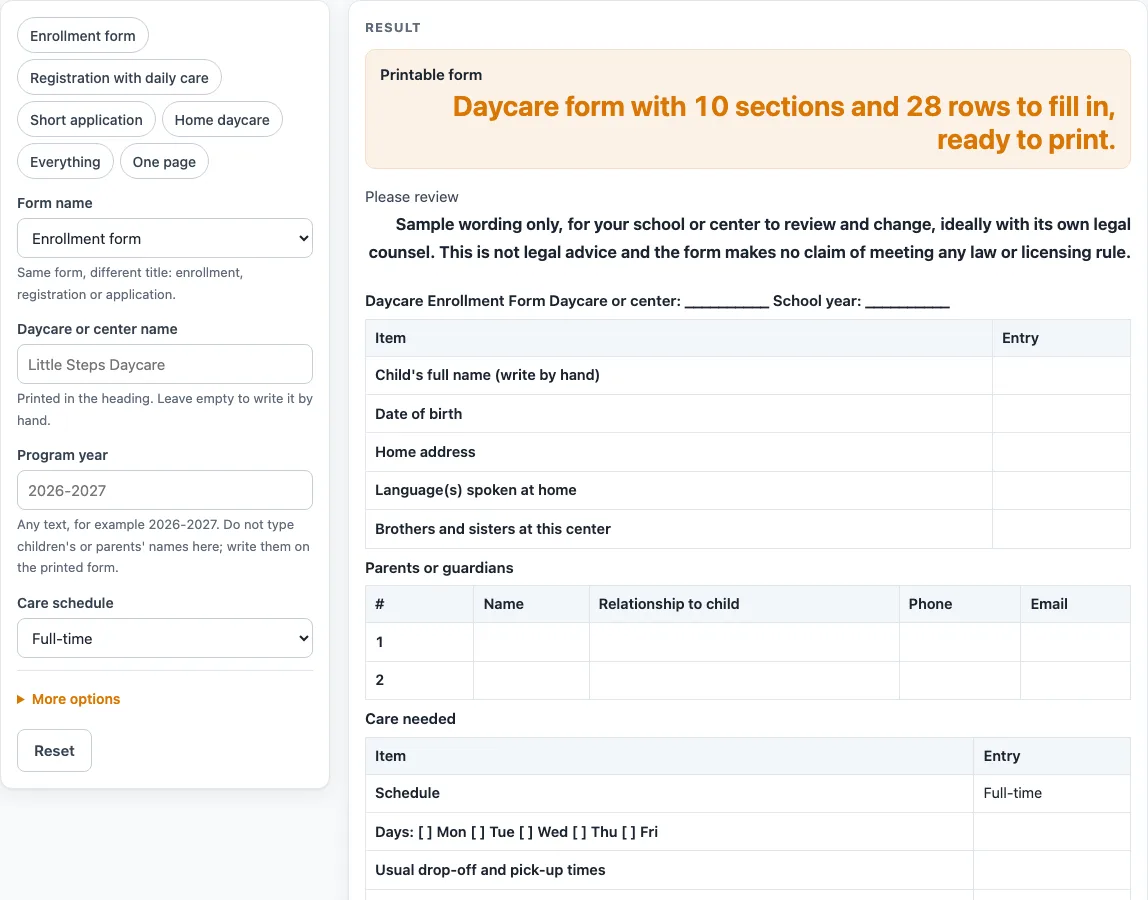
How to use the Daycare Enrollment Form
- Under “Form name”, choose Enrollment form, Registration form or Application form. The title at the top changes to match.
- Type the “Daycare or center name” and the “Program year”.
- Choose a “Care schedule”: Full-time (the default), Part-time, Drop-in, or “Leave blank (write by hand)”.
- Set “Parent or guardian rows” (default 2), “Authorized pick-up rows” (default 3) and “Emergency contact rows” (default 2). Each takes a number from 1 to 20.
- Turn on “Daily care lines (sleep, meals, toileting)” and “Permission tick boxes (sample wording)” only if you need them. Both are off by default.
- Enter the “Start date (optional)” as text, and add an “Extra note (optional)” if you want one.
- Check the row count in the result line. The default is 28 rows in 10 sections. A count above 20 is cut to 20 with a warning, and 0 or text gives an error.
- Try a preset if you want a shorter or longer sheet: Enrollment form, Registration with daily care, Short application, Home daycare, Everything, or Compact.
- Print the sheet, then write the child’s details, parent details and health information by hand.
- Use “Download as CSV” to save the tables as a .csv file made in your browser.
Header text and optional note lines stay in your browser and are written into the page address, so the address will show them. The print view shows only the heading and the bordered tables in black and white, with tick boxes printed as [ ].
What does a daycare enrollment form collect?
A daycare enrollment form collects the details a center needs before a child starts: who the child is, who to call, who may collect the child, and what care and health information staff should know. This tool groups those details into tables and blank lines so you can fill them in by hand after printing.
The child block has five blank lines for full name, date of birth, home address, languages spoken at home, and brothers and sisters at this center. The tool has no field for these, so they stay blank. The parent table has four columns: Name, Relationship to child, Phone and Email. The pick-up and emergency tables use Name, Relationship to child and Phone. Care needed covers the schedule, days with Mon to Fri boxes, usual drop-off and pick-up times, and the start date. Health information gives four lines, and health records gives three.
How are the rows on a daycare registration form counted?
Each row count is a number you set, and the total is the sum of the blocks. The default sheet has 28 rows across 10 sections, worked out as 5 + 2 + 4 + 3 + 2 + 4 + 3 + 1 + 1 + 3 = 28 rows. Changing a parent, pick-up or emergency count changes the total straight away.
Each input takes a whole number from 1 to 20. Presets give other totals: Short application has 16 rows, Compact has 20, and Everything has 39 rows in 12 sections. A shorter sheet is easier to print on one page, while a longer one leaves space for more contacts.
Why are the permission lines sample wording?
The permissions block covers outings, sunscreen, photos inside the center and basic first aid. Each has a tick box, and the wording is labelled as sample wording. The block is off by default, so it appears only when you switch it on. Have any wording reviewed by the people responsible for your center before you use it with families.
The form also ends with a confirmation sentence, a parent or guardian signature, and an office-use block for date received, staff initials and start date confirmed. The field selection is our own design based on common practice. It is not mapped to any state licensing form, and the page does not claim to meet licensing requirements. Check the rules that apply to your setting with the body that licenses it.
Worked examples
| Input | Result |
|---|---|
| 28 rows | 10 sections, 28 rows |
| 33 rows | 11 sections, 33 rows |
| 16 rows | 6 sections, 16 rows |
| 39 rows | 12 sections, 39 rows |
| 21 rows | 9 sections, 21 rows |
Calculated by the tool above; open it with the same values to see each step.
Frequently asked questions
Is this daycare enrollment form a legal or licensed form?
No. The field selection is our own design based on common practice, and it is not mapped to any state licensing form. Ask the body that licenses your setting which items it requires.
Can I type a child’s name into the tool?
No. There is no input for a child’s or a parent’s name or any personal detail. Those lines print blank, so you fill them in by hand after printing.
Is a daycare application form different from a daycare registration form?
Only the title changes. The form name choice switches the heading between enrollment, registration and application, and the blank layout stays the same.
Is my information saved or uploaded?
Everything runs in your browser. Nothing is uploaded, and typed header text and optional note lines are written into the page address. The Download as CSV button saves the tables as a file made in your browser.
Why does the row total change?
The total is the sum of every count you set. The default is 28 rows. Counts above 20 are cut to 20 with a warning, and 0 or text gives an error.
What does the printed sheet look like?
The print view shows only the heading and the bordered tables in black and white. Tick boxes print as [ ], so they do not depend on colour.
Related tools
- Attendance Sheet: Use it to record which children arrive and leave each day.
- Daycare Contract Template: Use it when you want a written agreement alongside the enrollment paperwork.
- Daycare Cost Calculator: Use it to work out costs from the numbers you enter.
- Emergency Contact Form: Use it when you need a separate sheet for emergency contacts.
- Field Trip Permission Slip: Use it when a family needs to approve an outing.
- Media Release Form (Sample): Use it as a sample when you are planning photo permissions.
- Nanny Cost vs Daycare Calculator: Use it to compare costs from the numbers you enter.
- Parent Contact Log: Use it to record calls and messages with families.