End of Year Report Card Comments
Choose an area, a level and a pronoun to get five comments about growth over the year, with optional next steps for summer and a closing line.
End of year report card comments are short notes that describe a child’s growth over the school year and what may come next. This free tool builds five of them at a time, so you can choose the ones that fit the child you teach. It runs in your browser, needs no sign-up, and uploads nothing you enter.
Each comment is put together from a bank of 206 sentences written for this site, not copied from any other website. You choose a skill area, a level and a pronoun set, then add an optional next step or closing line. The comments are starting points, so check them against the child and your school’s guidelines before you use them. You can copy each comment, copy all five, or print them.
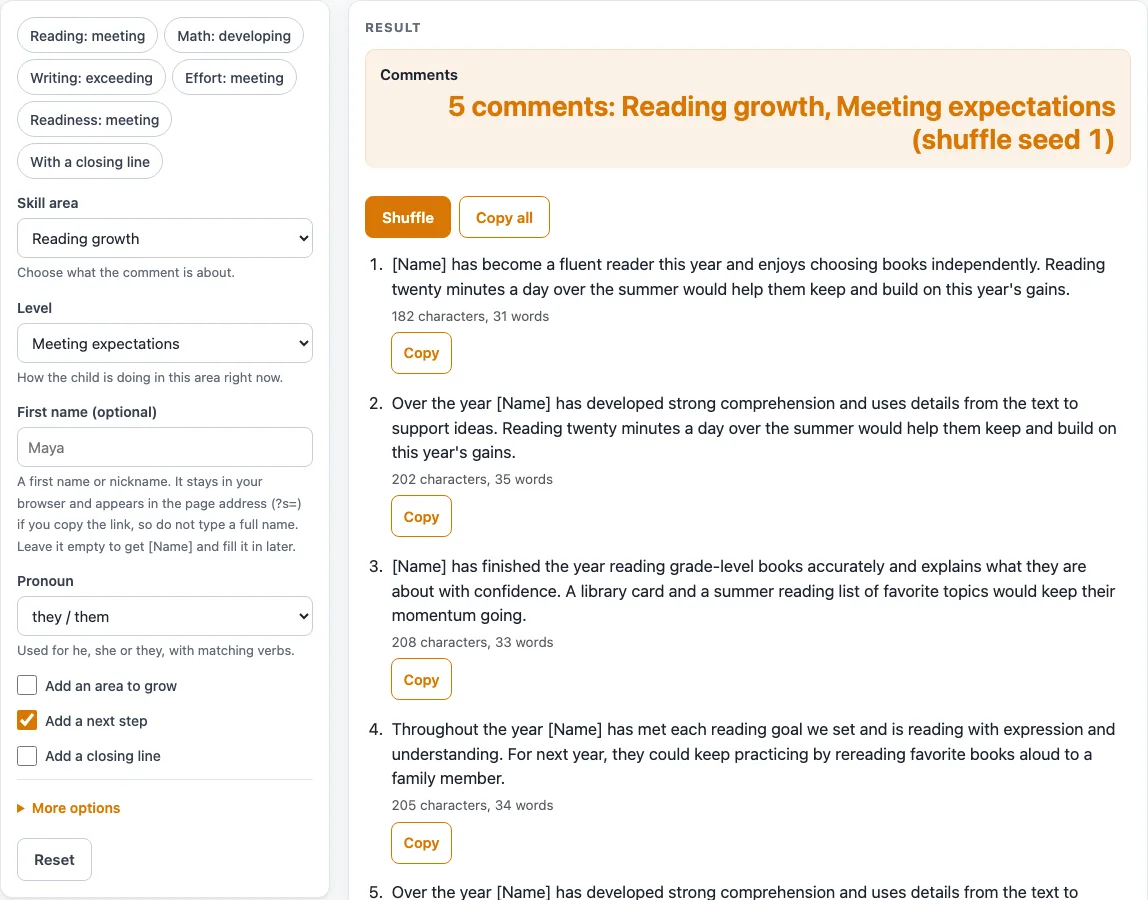
How to use the end of year report card comments tool
- Open the “Skill area” select and choose one of nine areas, such as “Reading growth”. The default is “Reading growth”.
- Open the “Level” select and choose “Needs support”, “Developing”, “Meeting expectations” or “Exceeding expectations”. The default is “Meeting expectations”.
- The “First name (optional)” field holds up to 24 characters. Use a first name or nickname only. If it is empty, each comment starts with [Name].
- Open the “Pronoun” select and choose “she / her”, “he / him” or “they / them”. The default is “they / them”.
- Set the three checkboxes. “Add an area to grow” is off by default, “Add a next step” is on, and “Add a closing line” is off.
- Notice the length. Each comment has one to four sentences, depending on those checkboxes, and the default is two.
- Read the five comments. Each one shows its character and word count.
- Click “Copy” under any comment, or click “Copy all”.
- Click “Shuffle” to see a different set. To repeat a set later, change the “Shuffle seed” in the advanced settings. It accepts 0 to 999999, and the default is 1.
- Print the page to print the five comments.
You can also click one of the six preset chips, such as “Reading: meeting” or “With a closing line”, to fill in the settings for you and then adjust them.
What are end of year report card comments?
End of year report card comments are short written notes that tell a family what a child has learned and how they have grown over the school year. They usually name a skill, describe progress, and sometimes suggest a next step for the summer or the next grade.
How does this tool build each comment?
The tool builds each comment from a bank of 206 sentences written for this site. The bank holds 144 strength sentences about growth over the year, 27 “area to keep growing” sentences, 27 “next year or summer” sentences and 8 optional closing lines. The tool does not copy any other website’s comments.
Why do strengths come first?
Every sentence in the bank follows the same editorial rules. Each comment opens with a strength, and each strength names a specific, observable skill. The wording shows growth with phrases such as “is learning to” and “is working on”. The sentences avoid labels, diagnoses, comparisons with other children, and promises or predictions about the future.
How do the skill area and level change the wording?
The skill area sets the topic. The nine areas are reading, writing, math, science and social studies, social and emotional growth, independence and responsibility, effort and perseverance, participation and speaking, and readiness for next year. The level sets how strong the progress is described. Each level has its own sentences, which describe progress “by spring” or readiness for the next grade, without promising what will happen next year.
Why do pronouns and names matter?
Each pronoun set uses matching verbs, including the present perfect. For example, the tool can write “Maya has become a fluent reader” or “They have grown”. A typed name always takes the singular verb. With no name, the comment starts with [Name]. With a name, the name is used once and later sentences use the pronoun.
Why are these comments starting points, not final text?
A comment is only a draft. Your knowledge of the child matters more than any sentence in the bank, and your school’s guidelines decide what a report card must include. Edit each comment before you use it. The result area reminds you of this.
Why does the tool sometimes show only four comments?
When “Add an area to grow”, “Add a next step” and “Add a closing line” are all off, only four different comments exist for each skill area and level. In that case the tool shows four and warns that only 4 different comments are possible.
Worked examples
| Input | Result |
|---|---|
| Reading growth, Meeting expectations, they / them | [Name] has become a fluent reader this year and enjoys choosing books independently. Reading twenty minutes a day over the summer would help them keep and build on this year's gains. |
| Math growth, Developing, she / her | Maya has grown steadily in math this year and is close to solving grade-level problems without support. Explaining the steps of a solution in writing is a skill she is still developing. Short, regular fact practice over the summer, such as a few minutes a day, would help her keep this year's gains. |
| Readiness for next year, Meeting expectations, he / him | The year's work shows readiness for the next grade in reading, writing, math and classroom habits. Visiting the next classroom, if possible, would help him feel at ease on the first day. It has been a pleasure to teach him this year. |
| Social and emotional growth, Exceeding expectations, they / them | Alex has shown great maturity in handling feelings and helps others do the same. |
Calculated by the tool above; open it with the same values to see each step.
Frequently asked questions
Is this end of year report card comments tool free?
Yes. It is free, runs in your browser and needs no sign-up. Nothing you enter is uploaded or stored.
Can I use the comments exactly as they appear?
They are starting points. Check each one against the child and your school’s guidelines, and edit it before you use it.
How do I get the same five comments again?
Set the “Shuffle seed” in the advanced settings. The seed accepts 0 to 999999, and the same seed gives the same set. The default is 1.
Does the tool keep the first name I type?
The name stays in your browser. It appears in the page address (?s=) when you copy the link.
Why do I see “Only 4 different comments are possible”?
“Add an area to grow”, “Add a next step” and “Add a closing line” are all off, so only four different comments exist for that skill area and level. Turn one of them on to see more variety.
Can I type a full name?
Use a first name or nickname only. The tool keeps letters, numbers, spaces, apostrophes, hyphens and periods, and it warns if the name has more than two words. If you leave the name empty, each comment starts with [Name] so you can fill it in later.
Are the sentences copied from other websites?
No. The 206 sentences were written for this site. None of them appears on the general report card comments page or the kindergarten page.
Related tools
- Report Card Comments: Use this for comments that are not tied to the end of the year.
- Report Card Comments for Kindergarten: Use this when you write comments for kindergarten children.
- Report Card Template: Use this to lay out a report card before you add comments.
- Final Grade Calculator: Use this to work out a final grade from the numbers you enter.
- Weighted Grade Calculator: Use this when different assignments count for different shares of a grade.
- Test Score Calculator: Use this to calculate a test score from the numbers you enter.