Final Grade Calculator
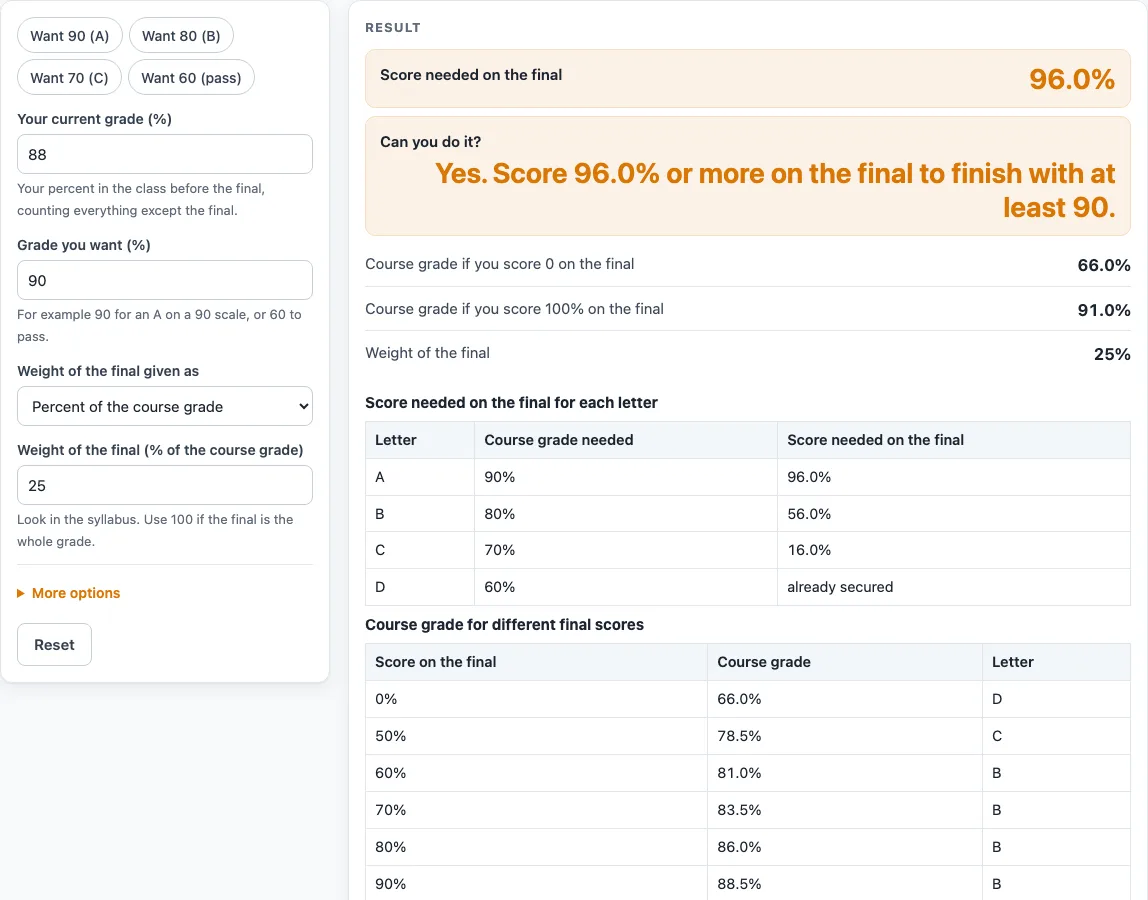
Enter your current grade, the grade you want and how much the final counts. You get the score you need on the final, and the lowest and highest course grade possible.
How to use the Final Grade Calculator
- Type “Your current grade (%)”. This is your grade for everything except the final.
- Type the “Grade you want (%)”. The default is 90.
- Choose how the final is weighted (“Weight of the final given as”): percent of the course grade (default 25) or points.
- For a percent weight, enter the final’s share of the course. It must be above 0 and no more than 100.
- For points, enter “Points the final is worth” and “Total points in the whole course”. The final cannot be worth more than the total.
- Read the score needed on the final.
- If the score needed is over 100%, the result says the target cannot be reached with the final alone and shows your best case.
- If the score needed is zero or below, the result says the target is already secured and shows your course grade with a 0 on the final.
- Look at the table “Score needed on the final for each letter” for each letter on your chosen scale. Look at “Course grade for different final scores” for the course grade and letter at final scores of 0, 50, 60, 70, 80, 90 and 100%.
- Under more options, set “Show percents rounded to” (whole number, 1 or 2 decimal places, or up to 4 decimals) and the “Letter-grade scale”.
The presets “Want 90 (A)”, “Want 80 (B)”, “Want 70 (C)” and “Want 60 (pass)” fill in the target grade for you. You can copy the result, copy a link, or print it. Rounding changes only how numbers appear, not the calculation.
What does the score needed on my final mean?
The score needed on your final is the percent you must earn on the final exam so your overall course grade reaches your target. It comes from the numbers you enter, not your school’s policy. If your current grade is 88%, your target is 90%, and the final is worth 25%, the score needed is 96%.
How is the score needed calculated?
The formula is: score needed = (100 × target − current × (100 − W)) ÷ W, where W is the weight of the final in percent. The current grade is multiplied by the share of the course that is not the final, and that amount is subtracted from the target before dividing by the final’s weight.
Using the default numbers: (9000 − 6600) ÷ 25 = 2400 ÷ 25 = 96%. A second example is a final worth 40%, with a current grade of 75% and a target of 80%: (8000 − 4500) ÷ 40 = 87.5%.
What if the score needed is over 100%?
If the score needed is over 100%, the target cannot be reached with the final alone. The result says so and shows your best case, which is your current grade’s share of the course plus a perfect 100% on the final. For example, with a current grade of 82%, a target of 90% and a final worth 20%, the score needed is 122%. The best case is 85.6%.
What if the target is already secured?
If the score needed is zero or below, your target is already secured, even with a 0 on the final. The result then shows your course grade with a 0 on the final. For example, with a current grade of 95%, a target of 70% and a final worth 20%, the score needed is −30. The lowest possible course grade is 76%.
Why does the weight of the final matter?
The weight decides how much the final can move your overall grade. The lowest possible course grade is your current grade multiplied by (100 − W) ÷ 100, and the highest is that amount plus W. With a current grade of 88% and a 25% final, the lowest possible grade is 66% and the highest is 91%. A final worth 100% makes the current grade irrelevant, so the page warns you. A final above 60% triggers a warning that it moves the result a lot. A weight above 100% or at or below 0 is treated as an error.
How do points change the weight?
In points mode, the weight is the final’s points divided by the total course points, multiplied by 100. For example, 150 points out of 600 gives a weight of 25%. The current grade is then the percent you have earned on the other points.
What about several remaining assessments?
The tool handles a single final. If several assessments remain, add their weights together and treat them as one block. The number shown is then the average you need across that block.
Why are extra credit values not assumed?
Extra credit is never assumed. A current grade above 100% or a target above 100% is accepted, but the page shows a warning. The letter scales are common US examples, not any school’s policy, so check your own grading rules.
Sources (checked 15 October 2026): thecalculatorsite.com
Worked examples
| Input | Result |
|---|---|
| Current 88%, target 90%, final worth 25% | Needed on the final: 96.0% |
| Current 80%, target 85%, final worth 50% | Needed on the final: 90.0% |
| Current 75%, target 80%, final worth 40% | Needed on the final: 87.5% |
| Current 91.5%, target 90%, final worth 25% | Needed on the final: 85.5% |
Calculated by the tool above; open it with the same values to see each step.
Frequently asked questions
Does the calculator know my syllabus?
No. The page assumes that the weight and current grade you type are correct. Check them against your course outline before you use the result.
What is the difference between percent and points mode?
Percent mode takes the final’s share of the course directly. Points mode takes the final’s points and the total course points, then calculates the share for you. The final’s points cannot be more than the total.
Can I enter a current grade above 100%?
Yes. A current grade above 100% is accepted with a warning. Extra credit is never assumed in the calculation.
Are the letter scales official?
No. The plain A 90, B 80, C 70, D 60 scale and the plus/minus scale are common US examples. They are not any school’s policy.
What happens if the final is worth 100% of the grade?
The current grade no longer affects the result, so the page warns you about this. The score needed is then the same as the target.
Does the tool need any personal details?
The calculation runs in your browser and the tool is free. It has no input for names or other personal details.
Can I use this if I have more than one test left?
Yes, with a method. Add the weights of the remaining assessments together and enter the total as the final’s weight. The result is then the average you need across those assessments.
Related tools
- Weighted Grade Calculator: use it when your course has several graded categories with different weights.
- Test Score Calculator: use it to work out a percent score from points on a single test.
- Report Card Template: use it to make a printable report card sheet to fill in after you have your grades.
- Report Card Comments: use it to build comment text to go with grades on a report card.
- End of Year Report Card Comments: use it when you are writing end-of-year comments.
- Report Card Comments for Kindergarten: use it when you are writing comments for kindergarten students.