Parent Contact Log
Choose the columns and the number of rows, then print a blank log for calls, emails, notes and meetings with parents, or download it as a CSV.
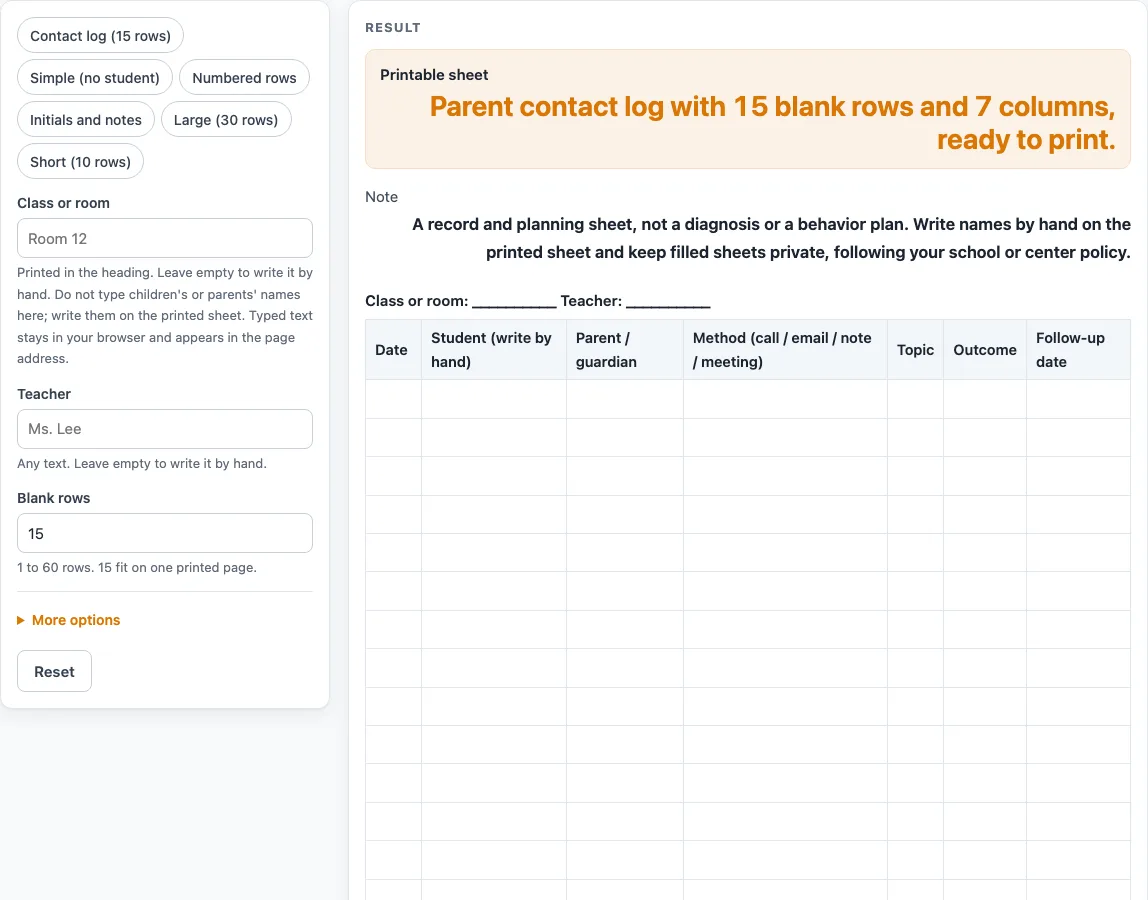
How to use the Parent Contact Log
- Type the class or room in the “Class or room” box and the teacher’s name in the “Teacher” box. Empty fields print as blank lines. Do not type children’s or parents’ names here.
- Set “Blank rows”. The tool accepts 1 to 60, and the default is 15.
- Pick a preset if you want a starting layout: “Contact log (15 rows)”, “Simple (no student)”, “Numbered rows”, “Initials and notes”, “Large (30 rows)” or “Short (10 rows)”.
- Switch columns on or off with the ten column switches. The default sheet has seven columns: Date, Student, Parent / guardian, Method, Topic, Outcome and Follow-up date. “Number the rows”, “Staff initials column” and “Notes column” start off.
- Read the Method header, which lists call / email / note / meeting, so you can write one of those in each row.
- Watch for messages. Having more than 8 columns on shows a warning that they print very small. Entering more than 60 rows cuts the number to 60 with a warning. A value below 1 or text gives an error.
- Print the sheet. The print view shows the heading and a bordered table. Write student and parent names by hand on the printed copy.
- For a digital copy, use the CSV download button. The file contains the heading, column names and blank rows, and it opens in a spreadsheet. It is made in your browser.
Presets are the fastest starting point, and you can still change any switch after you pick one.
What should a parent contact log record?
A parent contact log should record each contact in its own row, so one line shows when it happened, who was contacted and what was discussed. The default columns cover the main points: Date, Student, Parent / guardian, Method, Topic, Outcome and Follow-up date. Together they let a reader see the whole contact at a glance.
What does the Method column mean?
The Method column tells you how the contact happened. Its header reads “Method (call / email / note / meeting)”, so you can write one of those four words in each row. Using the same four words throughout keeps the log consistent and easier to scan.
How should I use the follow-up date column?
The Follow-up date column is for the day you plan to check back with the parent or guardian. Write it in the row for the contact that created the need for follow-up. If no follow-up is needed, leave the cell blank. If you never plan follow-ups, the “Simple (no student)” preset leaves this column out, or you can switch off “Follow-up date column” yourself.
Which preset should I start from?
“Contact log (15 rows)” is the default seven-column sheet. “Simple (no student)” drops the Student and Follow-up date columns. “Numbered rows” adds a number column and drops Student. “Initials and notes” adds Staff initials and Notes and drops Student, which gives eight columns. “Large (30 rows)” doubles the rows, and “Short (10 rows)” gives ten rows without the Outcome column. After choosing one, you can still change any switch.
Why is there no name field?
The tool has no name field. Student and parent names are written by hand on the printed sheet, and the tool stores nothing. Typed heading text stays in your browser and appears in the page address (?s=), so keep the heading to the class or room and the teacher’s name. Who may see the sheet, and how long it is kept, is up to your school or center.
Worked examples
| Input | Result |
|---|---|
| 15 rows | 15 rows, 7 columns |
| 15 rows | 15 rows, 5 columns |
| 20 rows | 20 rows, 8 columns |
| 10 rows | 10 rows, 6 columns |
Calculated by the tool above; open it with the same values to see each step.
Frequently asked questions
Is the parent contact log free to use?
Yes. The tool is free, needs no sign-up, and runs in your browser.
Does the tool save what I type?
No. It stores nothing, and nothing is uploaded. Typed heading text stays in your browser and appears in the page address (?s=).
Can I enter a student’s name on the page?
The tool has no name field, so write student and parent names by hand on the printed sheet. Keep the heading to the class or room and the teacher’s name.
What happens if I enter more than 60 rows?
The tool cuts the number to 60 and shows a warning. A value below 1 or text gives an error, so enter a whole number from 1 to 60.
Why does my printed sheet look small?
Having more than 8 columns on triggers a warning that they print very small. Turn off columns you do not need, such as “Number the rows” or “Notes column”, or print in landscape.
Does the tool tell me how long to keep contact records?
No. It says nothing about how long records must be kept or who may see them. The note under the sheet says to keep filled sheets private, following your school or center policy, so check what your school, district or center requires.
Related tools
- Attendance Sheet: Use it to record daily attendance for the same class or room.
- Emergency Contact Form: Use it to prepare a form that lists who to call in an emergency.
- Daycare Enrollment Form: Use it when you need a starting form for new children and families.
- Field Trip Permission Slip: Use it to ask parents or guardians for permission before a trip.
- Media Release Form (Sample): Use it as a sample when you want to ask permission before photos or recordings are shared.