Parent Teacher Conference Form
Choose the areas to discuss and the sections you need, then print a blank conference form with family input, action items and follow-up, or download it as a CSV.
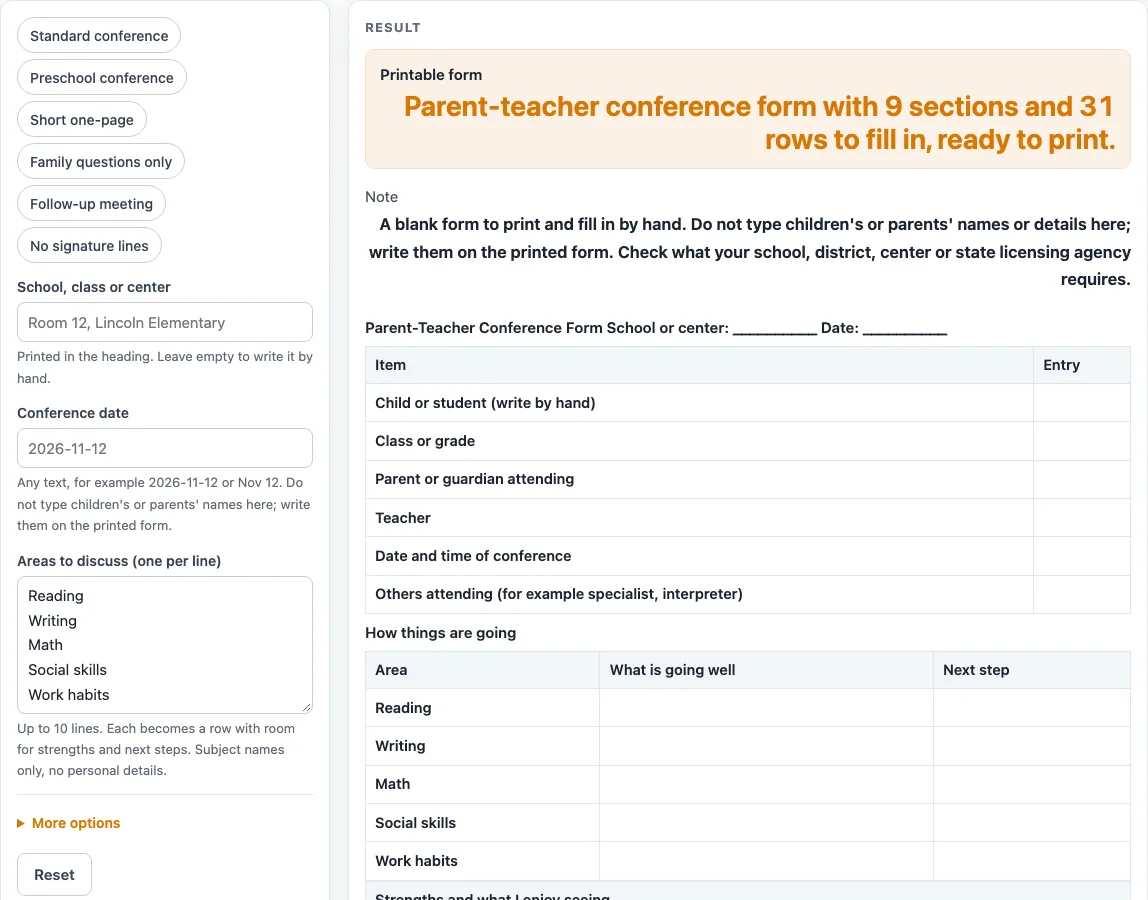
How to use the Parent-Teacher Conference Form
- Open the page. The default is already a complete form with 9 sections and 31 rows, so you can start from it or change it.
- Type your school, class or center in the “School, class or center” box. Leave it empty to write it by hand.
- Type the date in the “Conference date” box. It accepts any text, such as 2026-11-12 or Nov 12.
- In “Areas to discuss (one per line)”, type one area per line, up to 10. The default list is Reading, Writing, Math, Social skills and Work habits. An empty list gives 3 blank rows, and more than 10 lines are cut to 10 with a warning.
- Under the advanced options, set “Strength lines”, “Concern lines”, “Goal lines”, “Question lines” and “Action item rows”. Use whole numbers from 1 to 20; each defaults to 3. A number above 20 is cut to 20 with a warning, and 0 or text gives an error.
- Switch sections on or off. Defaults are the progress table, strengths, concerns, goals, family input, action items, follow-up and signature lines. “Questions section” starts off.
- Optionally pick a preset: “Standard conference”, “Preschool conference”, “Short one-page”, “Family questions only”, “Follow-up meeting” or “No signature lines”.
- Optionally add a note for the bottom in “Extra note for the bottom (optional)”, one line per note, up to 12 lines.
- Print the sheet, or use the CSV download button to save the tables as a .csv file.
Do not type children’s or parents’ names into any box.
What goes on a parent teacher conference form?
A parent teacher conference form is a written plan for one meeting. It sets out what the child is doing well, what the teacher wants to raise, the goals for the next few weeks, and what the family wants to share.
The form starts with a details block of six rows: child or student, class or grade, parent or guardian attending, teacher, date and time of conference, and others attending. All of these print blank so that you can write them by hand.
Next comes the progress table. Each area you typed becomes a row with two columns, “What is going well” and “Next step”. This keeps every area under discussion tied to a short plan.
The other sections give space for a conversation. Strengths and concerns hold short lists of observations. Goals records what the next few weeks should focus on. Family input gives the parent or guardian four prompts: what is going well at home, questions or concerns for the teacher, what you would like your child to work on, and the best way and time to reach you. The questions section gives space for questions to ask at the conference. Action items is a table with “What will be done”, “Who” and “By when”. Follow-up has a follow-up date and how you will follow up. Signature lines end the sheet.
How do the rows add up on a conference form?
Each section contributes a set number of rows, and the total is the sum of those rows. The default form has 9 sections and 31 rows, which comes from 6 + 5 + 3 + 3 + 3 + 4 + 3 + 2 + 2 = 31. The 6 is the details block, the 5 is the progress table with the five default areas, then come strengths, concerns and goals with 3 lines each, the 4 family prompts, 3 action item rows, 2 follow-up rows and 2 signature rows.
The “Short one-page” preset turns off the progress table, concerns, family input, questions and follow-up. Its rows are 6 + 3 + 3 + 2 + 2 = 16 in 5 sections. “Family questions only” gives 19 rows: 6 + 4 + 5 + 2 + 2.
Row counts decide how much writing space each part of the meeting gets. A shorter form leaves room for handwritten notes. Turn sections on or off, change the line counts, or pick a preset until the sheet matches the time and space you have.
Worked examples
| Input | Result |
|---|---|
| 31 rows | 9 sections, 31 rows |
| 34 rows | 10 sections, 34 rows |
| 16 rows | 5 sections, 16 rows |
| 19 rows | 5 sections, 19 rows |
| 20 rows | 6 sections, 20 rows |
Calculated by the tool above; open it with the same values to see each step.
Frequently asked questions
Is the parent teacher conference form free to use?
Yes. It is free, it runs in your browser, and there is no sign-up. You can print the sheet or download the tables as a CSV file.
Does this form meet what my school or district requires?
The tool makes no claim about any requirement. The note under the sheet tells you to check what your school, district, center or state licensing agency requires, and you can change the sections to fit.
Can I type a child’s or parent’s name into the form?
No. Do not type names into any box. The child, parent and teacher lines print blank so that you can fill them in by hand.
Is what I type saved or sent anywhere?
Nothing is uploaded. Typed heading text and the optional note lines stay in your browser and are written into the page address. The CSV file is made in the browser.
What does the Preschool conference preset change?
It swaps the areas to discuss for five preschool areas and turns the questions section on, which gives 10 sections and 34 rows. You can still switch any section on or off afterwards.
What happens if I enter more than 10 areas to discuss?
The list is cut to 10 and a warning is shown. Enter 10 areas or fewer to keep every area on the progress table.
Related tools
- Parent Contact Log: Use it to record calls, emails and meetings with parents after the conference.
- Behavior Log: Use it to keep notes you may want to bring to a conference.
- Attendance Sheet: Use it to record who was present for each day or session.
- Emergency Contact Form: Use it to collect the contacts you need in case of an emergency.
- Daycare Enrollment Form: Use it when a family is joining a daycare and you need a blank intake sheet.
- Field Trip Permission Slip: Use it to ask a family for written permission for a trip.
- Media Release Form (Sample): Use it as a sample when asking a family about sharing photos or work.