Permission Slip Template
Type the activity and date, pick the sections, then print a blank permission slip with a tear-off return slip, or download it as a CSV.
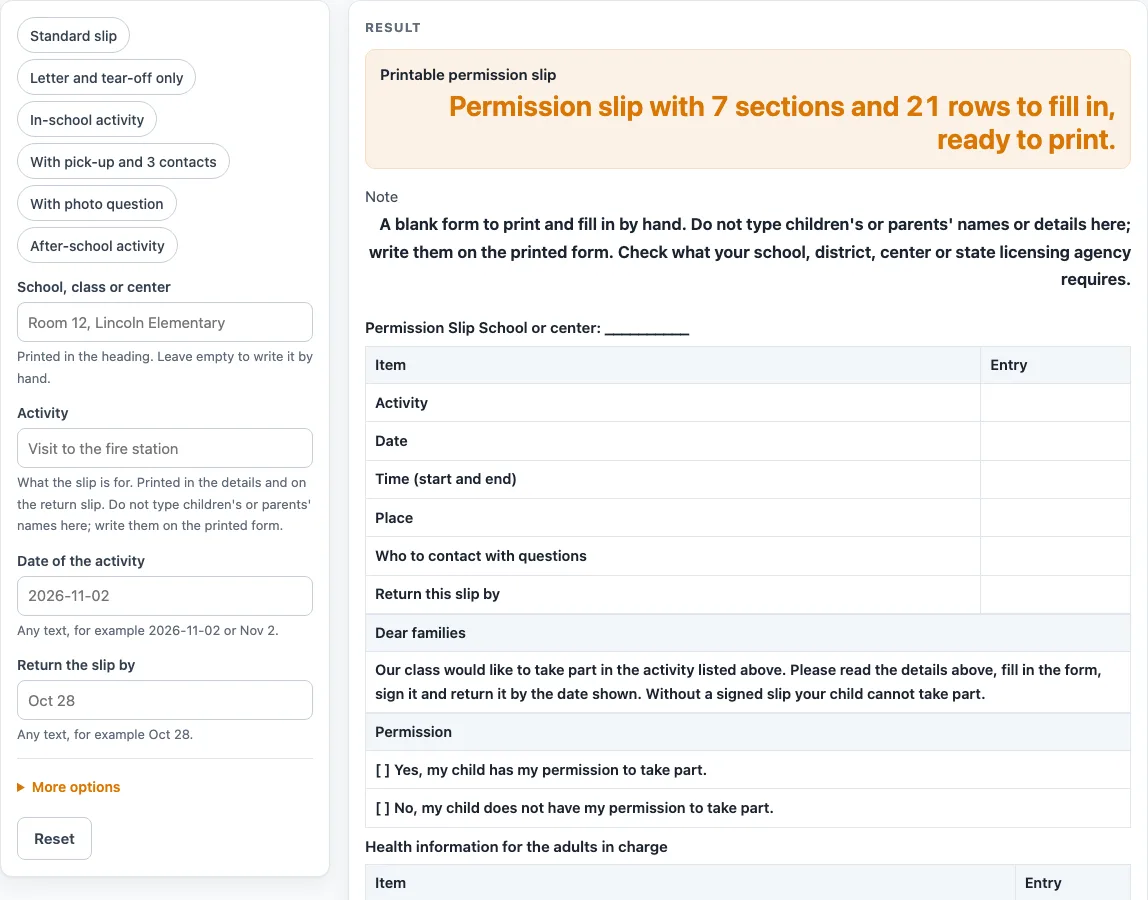
How to use the Permission Slip Template
- Open the page. The default is the “Standard slip” preset, which already has 7 sections, 21 rows and a tear-off return slip.
- Type your school, class or center in the “School, class or center” box. Leave it empty to write it by hand.
- Type the “Activity”. It fills the letter to families, the “Activity” line in the details table and the same line on the return slip.
- Type the “Date of the activity” and “Return the slip by”. These fill the “Date” line and the “Return this slip by” line.
- Under the advanced options, set “Emergency contact rows” from 1 to 20. The default is 2. Numbers above 20 are cut to 20 with a warning, and 0 or text gives an error.
- Turn sections on or off with their switches. “Going home section” and “Photo and video question” start off, so switch them on only if you need them.
- If needed, type a note of up to 12 lines in “Extra note (optional)”. Do not type names or private details.
- Check the letter, the details table, the permission boxes and the return slip below the cut line.
- Print the page. Use the CSV download button if you want the tables as a .csv file.
For a shorter layout, choose a preset such as “Letter and tear-off only” (12 rows) or “In-school activity” (10 rows). The child’s name, the parent’s signature and the other personal lines print blank, so you fill them in by hand.
What does a permission slip template need to include?
A useful permission slip template covers the activity details, a clear yes or no choice, health and emergency contact information, and a return slip with a return-by date. This tool lays these out in the order families read them.
The details table has six lines: Activity, Date, Time (start and end), Place, Who to contact with questions and Return this slip by. Activity, Date and the return-by line are filled from what you typed. The rest print blank. The short letter under “Dear families” says the class would like to take part in your typed activity, or “the activity listed above” when the field is empty. It asks families to fill in the form, sign it and return it by the date shown, and says that without a signed slip the child cannot take part.
Permission is two tick boxes: “Yes, my child has my permission to take part.” and “No, my child does not have my permission to take part.” The health block has four blank lines for allergies, medication needed during the activity, other health needs, and doctor or clinic and phone. The emergency table has numbered rows with Name, Relationship and Phone, and a signature row for the parent or guardian follows it. The optional “Going home” section has 2 lines. The optional photo and video question has 2 boxes and refers to the school’s media release. It contains no release wording, so use a separate media release if you need one.
The return slip sits below a cut line with 5 lines: the child’s name (write by hand), the activity, yes and no boxes, the parent or guardian signature and date, and a phone number for today.
How does the row total change?
The total row count is the sum of the rows in each section that is switched on, so it changes when you turn sections on or off or change the number of emergency contact rows. The default is 6 + 1 + 2 + 4 + 2 + 1 + 5 = 21 rows: details, letter, permission boxes, health lines, two emergency rows, signature and return slip. The “Letter and tear-off only” preset uses 6 + 1 + 5 = 12 rows. The “In-school activity” preset uses 6 + 1 + 2 + 1 = 10 rows. Use the total to see how long the printed sheet will be before you print.
Worked examples
| Input | Result |
|---|---|
| 21 rows | 7 sections, 21 rows |
| 12 rows | 3 sections, 12 rows |
| 10 rows | 4 sections, 10 rows |
| 26 rows | 9 sections, 26 rows |
Calculated by the tool above; open it with the same values to see each step.
Frequently asked questions
Is this permission slip template free to use?
Yes. It runs in your browser, it is free, and you do not need to sign up.
Do I need to type a child’s or parent’s name?
No. Do not type names into any box. The child and parent lines print blank so you can fill them in by hand.
Does the template meet my school’s requirements?
The tool makes no claim about any requirement. The note under the sheet tells you to check what your school, district, center or state licensing agency requires before you send a form home.
Can I make a shorter permission slip?
Yes. Choose a preset such as “Letter and tear-off only” (12 rows) or “In-school activity” (10 rows), or switch off sections you do not need.
What happens to the details I type?
Typed heading text stays in your browser and is written into the page address. The optional note lines are handled the same way. Nothing is uploaded.
Can I save the tables as a file?
Yes. The CSV download button saves the tables as a .csv file made in your browser.
What does the photo and video question do?
It is off by default. When you switch on “Photo and video question”, the slip adds two boxes, one allowing photos or video as described in the school’s media release and one asking that none be taken.
Related tools
- Field Trip Permission Slip: Use it when the activity is a trip away from the school.
- Media Release Form (Sample): Use it as a sample when you need wording about photos or video.
- Emergency Contact Form: Use it to gather emergency contact details on their own.
- Daycare Enrollment Form: Use it to collect enrollment details when a child joins a daycare.
- Daycare Contract Template: Use it when you need a general agreement between a provider and a family.
- Attendance Sheet: Use it to record attendance for a class or group.