Potty Training Chart
Choose the days and columns, add optional reminders and a goal, then print a potty chart to fill in with stickers.
How to use the Potty Training Chart
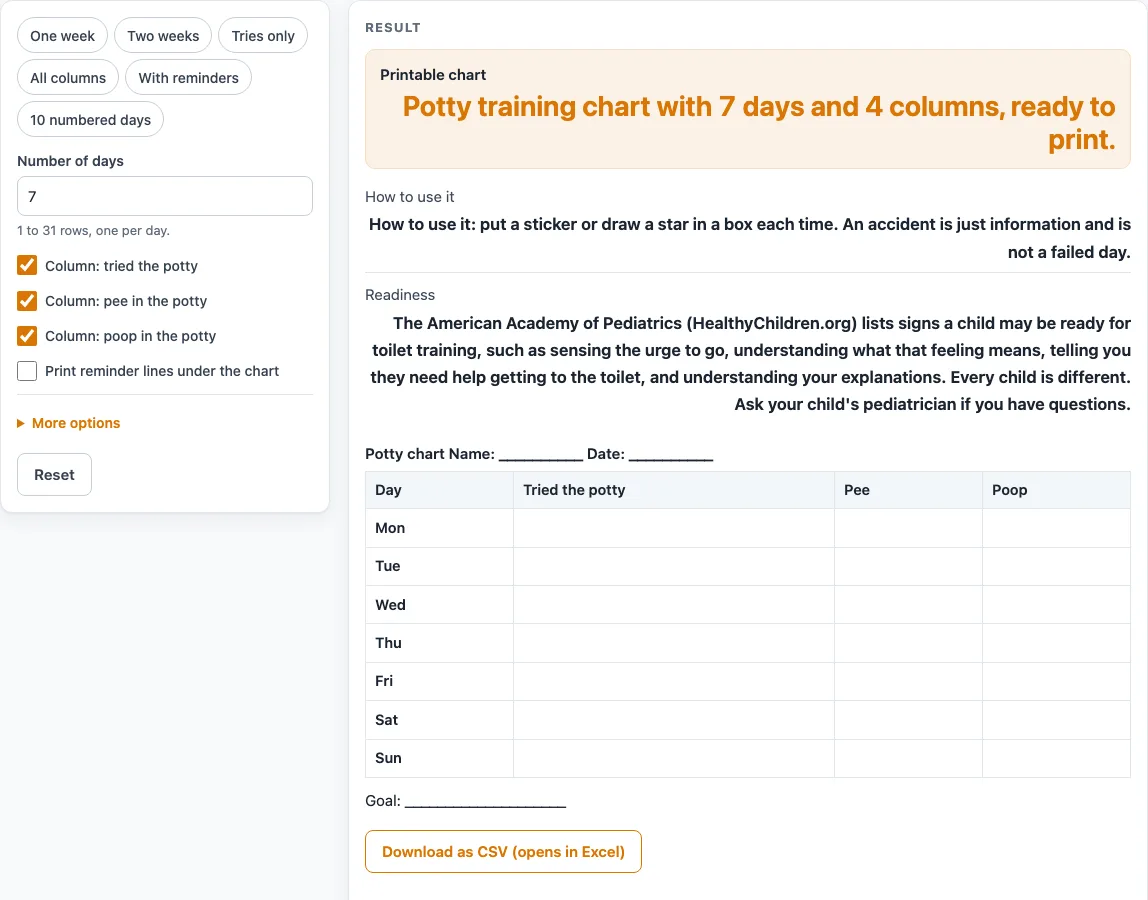
- Open the tool. It starts with seven weekday rows and four columns.
- Choose a preset if one fits: “One week”, “Two weeks”, “Tries only”, “All columns”, “With reminders” or “10 numbered days”.
- Set “Number of days”, from 1 to 31. With more than 7 days, labels carry the week, such as “Mon (wk 2)”.
- Under the advanced options, pick “Row labels”: weekday names or day numbers (Day 1, Day 2 and so on). For weekday names, choose “First day of the chart”. Monday is the default.
- Check the columns. Day, “Column: tried the potty”, “Column: pee in the potty” and “Column: poop in the potty” are on by default. Add “Column: dry underwear”, “Column: accident (no sticker)” or “Notes column” if you need them.
- Edit the “Chart title”. If you leave it empty, the title is “Potty chart”.
- Turn on “Print reminder lines under the chart” if you want them. The defaults are After waking up, After meals and snacks, Before leaving the house and Before bed. Edit them, up to 6 lines. They are your own routine, not advice.
- Type a “Reward goal (optional)”, which prints as “Goal: …”. Leave it empty for a blank line.
- The heading has blank Name and Date lines. Do not type a child’s name into the page.
- Print the sheet. Each time, put a sticker or draw a star in a box.
Presets only set these options for you. To keep your table, use the CSV download button.
What is a potty training chart for?
A potty training chart is a printed table that records each day of toilet training, with boxes where a sticker or star can go. The tool’s default is seven weekday rows and four columns: Day, “Tried the potty”, “Pee” and “Poop”. You can add “Dry underwear”, “Accident” and “Notes” if you want a fuller record. A potty chart works the same way under a shorter name.
Each row stands for one day, so the sheet keeps the same layout across the whole run. Choosing up to 31 days lets the chart cover a longer stretch than a single week. The “All columns” preset with 14 days gives 14 rows and 7 columns, with rows labeled Mon (wk 1) to Sun (wk 2). The “Tries only” preset keeps just Day and “Tried the potty”.
The boxes start empty, so the printed sheet can be filled in by hand as the days pass. The note under the table says to put a sticker or draw a star in a box each time.
The reminder lines under the table list points in the adult’s routine, such as After meals and snacks. They are your own routine written down, not advice, and you can edit them to match your day. The goal line works the same way: it is text you type, printed as “Goal: …”, for example “5 stickers = a trip to the park”.
What signs show a child may be ready?
The American Academy of Pediatrics, on HealthyChildren.org, lists signs that a child may be ready for toilet training. They include sensing the urge to go, understanding what that feeling means, telling you they need help getting to the toilet, and understanding your explanations. The page read for this tool gives no specific age, so the chart does not set a start date. Every child is different, so bring questions about timing to your child’s pediatrician.
How should I treat an accident on the chart?
The note under the table says an accident is just information and not a failed day. If you turn on the “Accident” column, you can mark it there, and the “Notes” column can hold a short remark about what happened.
Sources (checked 15 October 2026): healthychildren.org
Worked examples
| Input | Result |
|---|---|
| 7 days | 4 columns |
| 14 days | 7 columns |
| 7 days | 4 columns |
| 7 days | 2 columns |
Calculated by the tool above; open it with the same values to see each step.
Frequently asked questions
Is this potty training chart free to use?
Yes. The tool is free, needs no sign-up, and runs in your browser. When you are done, print the sheet or download the table as a CSV file.
Can I put my child’s name on the chart?
The tool has no field for a child’s name. The printed heading has blank Name and Date lines, so you can write a name by hand after printing. Please do not type a child’s name into the page itself.
Does the chart tell me when to start potty training?
No. The tool gives no specific age for starting. It cites the American Academy of Pediatrics list of readiness signs, including sensing the urge to go and telling you they need help getting to the toilet. For questions about timing, ask your child’s pediatrician.
What should I do when an accident happens?
Mark it in the “Accident” column if you have turned that column on. The note under the chart says an accident is just information and not a failed day, so you can record what happened in “Notes” and keep the chart going.
How many days can the chart cover?
From 1 to 31 days, one row per day. The default is 7. If you enter a number above 31, the tool uses 31 and shows a warning.
Can I keep the chart for next week?
The tool saves nothing on the site. Print the sheet and keep the paper, or download the table as a CSV file and keep that yourself.
Related tools
- Reward Chart: Use it when you want a simple sticker or points sheet for a different goal than toilet training.
- Behavior Chart: Use it to track daily behavior goals on a printable sheet.
- Behavior Log: Use it to write down behavior events as they happen across a day or week.
- ABC Behavior Chart: Use it to record what came before a behavior, the behavior itself and what followed.
- Classroom Jobs Chart: Use it to list and rotate jobs for a class or group.