Preschool Lesson Plan Template
Pick the parts of your preschool or pre-K day, print a blank weekly or daily plan with learning-domain labels, or start from a filled sample week and change it.
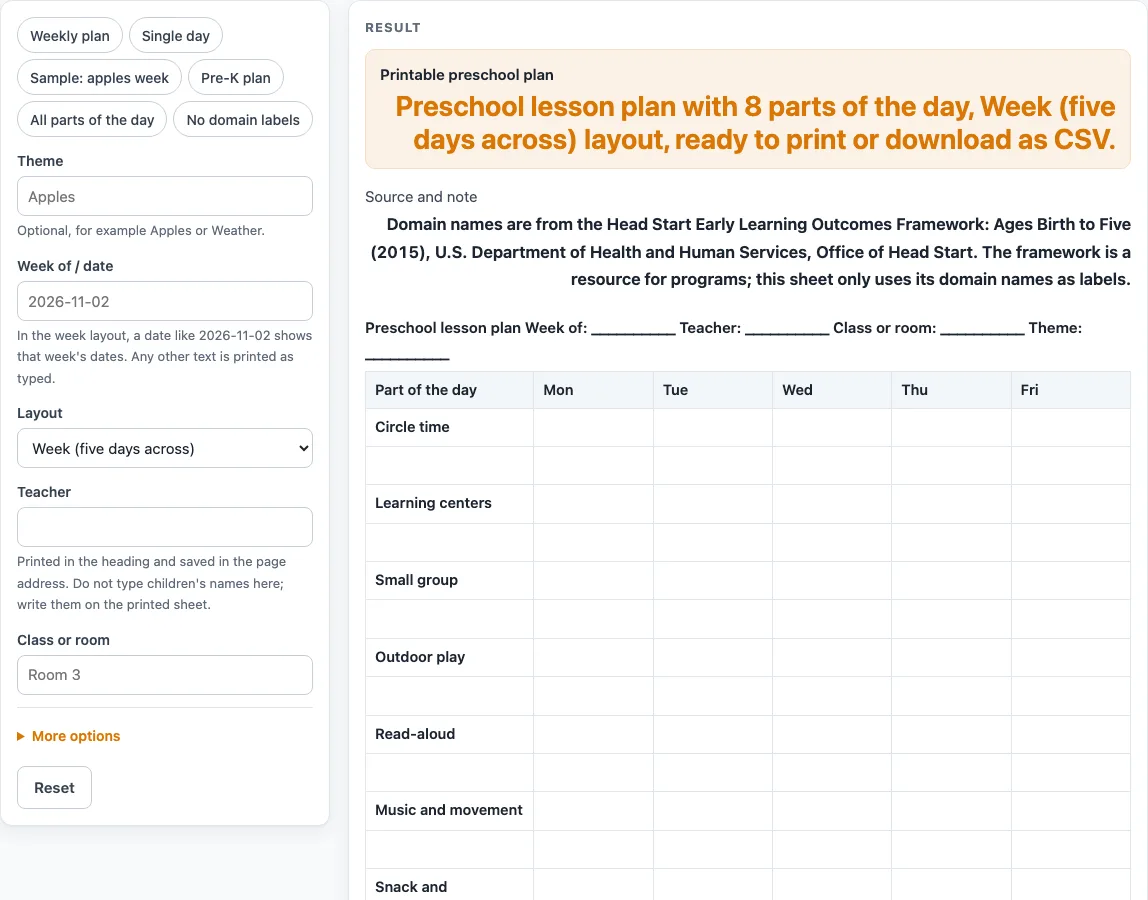
How to use the Preschool Lesson Plan Template
- Type your “Theme”. If you want, also type your “Teacher” and “Class or room”. These print in the heading.
- In “Week of / date”, type a real ISO date such as 2026-11-04. In the week layout, the grid then shows that week’s Monday to Friday dates, such as Mon 11/02. Other text prints as typed.
- Choose a “Layout”: week (five days across) or one day. The one-day layout can add a Materials column.
- Under the advanced options, pick “Plan for”: Preschool (ages 3 to 4) or Pre-K (ages 4 to 5). This changes the plan’s title.
- Set “Writing lines per part” from 1 to 4. The default is 2. Numbers above 4 are cut to 4 with a warning, and 0 gives an error.
- Switch parts of the day on or off. The default plan shows 8 parts. Turn on “Arrival and greeting” or “Family connection” if you need them. With every part off, you see “Switch on at least one part of the day.”
- Decide whether to keep “Show the learning domains table” on, and whether to turn on “Fill in the sample apples week”.
- Check the result. A table longer than 28 rows shows a long-table warning, so reduce the lines or the parts.
- Use the CSV download button to save the tables, or print the heading and bordered tables.
Presets give quick starts: “Weekly plan”, “Single day”, “Sample: apples week”, “Pre-K plan”, “All parts of the day” and “No domain labels”. The page settings are written into the page address.
What goes into a preschool lesson plan?
A preschool lesson plan lists what happens in each part of the day, for each day of the week. This tool uses ten parts of the day: Arrival and greeting, Circle time, Learning centers, Small group, Outdoor play, Read-aloud, Music and movement, Snack and transitions, Family connection, and Assessment and observation.
The default plan shows eight of them and leaves out Arrival and greeting and Family connection. Each part gets a set number of writing lines, two by default. That gives 16 empty rows in the week grid, with the columns Part of the day and the five weekdays, followed by the learning-domains table. Short, specific entries work best in a grid this small. The preset “Sample: apples week” shows the level of detail that fits: Monday circle time reads “Greet, calendar, apple words”, Wednesday learning centers reads “Dramatic play: apple stand”, and Friday observation reads “Note: retells in order?”. It uses the theme Apples and 1 line per part, which gives 8 rows.
The sample is our own example, not a required curriculum. Edit, shorten or replace any of it with your own plans. In the one-day layout, the sample shows the Monday entries only.
What do the learning domains mean on this page?
The learning-domains table lists seven preschool domains from the Head Start Early Learning Outcomes Framework: Ages Birth to Five (2015), published by the U.S. Department of Health and Human Services. The domains are Approaches to Learning; Social and Emotional Development; Language and Communication; Literacy; Mathematics Development; Scientific Reasoning; and Perceptual, Motor, and Physical Development. Each one has a blank cell headed “Where it shows up in this plan”.
The framework covers infants, toddlers and preschoolers, but this page uses only the preschool domain names as labels. With the sample on, the domain cells are filled with where each domain appears in the example week. Those entries are our suggestion, not an official crosswalk. If you do not want domain labels, use the “No domain labels” preset or switch the table off.
What is the difference between a weekly and a one-day plan?
The week layout gives one row per line for each part of the day and five day columns. The one-day layout swaps those for a single “Plan” column and, if you switch it on, a “Materials” column. The “Single day” preset sets 3 lines per part and turns the Materials column on.
Sources (checked 15 October 2026): headstart.gov
Worked examples
| Input | Result |
|---|---|
| Week (five days across) layout | 23 rows, 6 columns |
| Week (five days across) layout with the sample week | 15 rows, 6 columns |
| One day layout | 31 rows, 3 columns |
| Week (five days across) layout | 20 rows, 6 columns |
Calculated by the tool above; open it with the same values to see each step.
Frequently asked questions
Is this preschool lesson plan template free to use?
Yes. It runs in your browser with no sign-up, and nothing is uploaded.
What is the difference between Preschool and Pre-K plans?
“Plan for” offers Preschool (ages 3 to 4) or Pre-K (ages 4 to 5). The choice changes the plan’s title. The “Pre-K plan” preset is a quick start for a pre k lesson plan template.
Can I use the sample lesson plan for preschool as my own?
The sample is our example, not a required curriculum. Leave “Fill in the sample apples week” off to start from a blank grid, or edit the cells after you print or download it.
How do I plan one day instead of a whole week?
Set “Layout” to one day. The “Single day” preset gives 3 lines per part and adds a Materials column.
Does this template meet state rules for my program?
The tool makes no claim about any requirement. Check what your school, district, center or state licensing agency requires before you rely on any plan.
Can I enter a child’s name?
No. The page has no field for a child’s name. Typed text such as the teacher, class, date and theme prints in the heading and is written into the page address, so keep child names off the page.
Related tools
- Daily Lesson Plan Template: Use it when you need a plan for a single day in more detail.
- Kindergarten Lesson Plan Template: Use it when your class is older than preschool.
- Lesson Plan Template: Use it for a general lesson plan outside the preschool parts of the day.
- Preschool Schedule: Use it to lay out the order of your day.
- Preschool Visual Schedule: Use it to build a picture-based daily routine.
- Teacher Lesson Plan Book: Use it to keep plans together across a term.
- Weekly Lesson Plan Template: Use it for a week-based plan with a different layout.