Teacher Thank You Note
Choose an occasion and a tone, add the teacher's name and one thing you appreciated, and get a short note to copy or print.
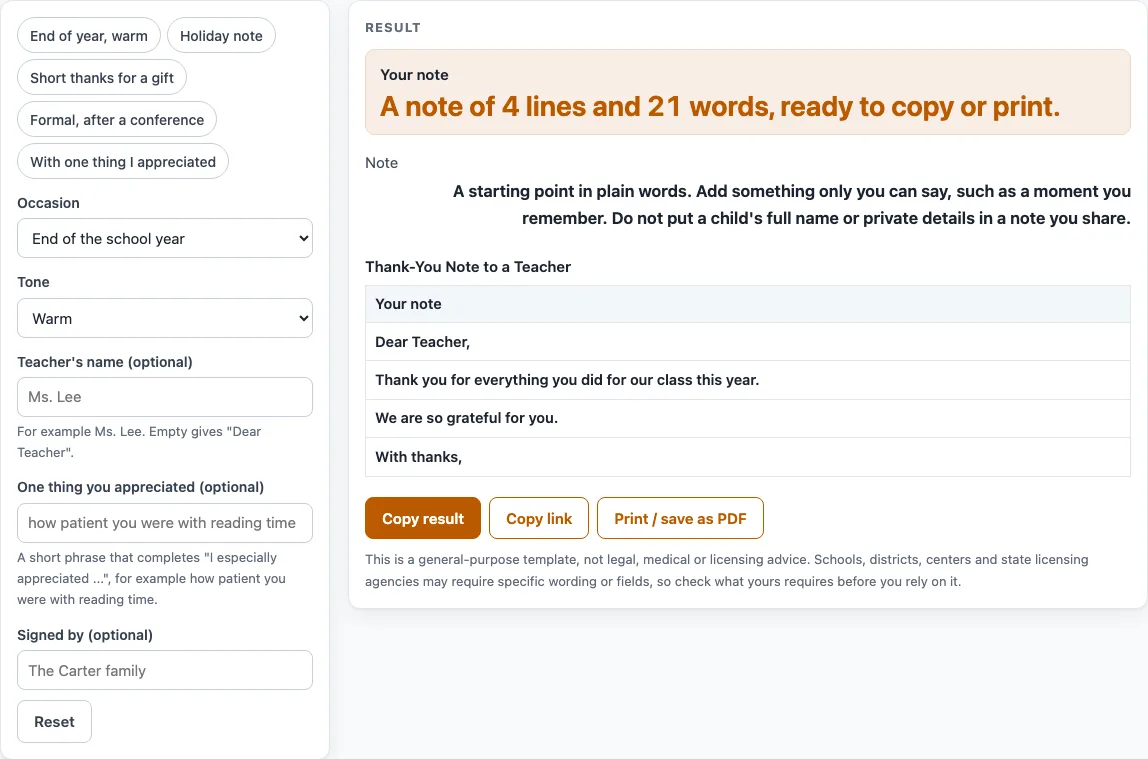
How to use the Thank-You Note to a Teacher
- Open the Occasion list and choose End of the school year, Holiday season, Thanks for a gift, After a parent-teacher conference or Any time. The tool opens on End of the school year.
- Pick a Tone: Warm, Short or Formal.
- Type the teacher’s name in Teacher’s name (optional). Leave it blank and the greeting reads “Dear Teacher,”.
- In One thing you appreciated (optional), type one short, specific detail, such as “the book” or “your clear feedback”.
- In Signed by (optional), type the name you want at the end, such as “The Carter family”. Leave it blank and the sign-off appears without a name.
- Read the note in the result area, check the word count, then copy or print it.
To save time, choose a preset instead: End of year warm, Holiday note, Short thanks for a gift, Formal after a conference or With one thing I appreciated. Each preset sets the controls for a common situation, and you can change any control afterward.
The note appears as plain text lines in a table. Copy the lines into a card, email or message, or print the page. The printed sheet is yours to use, including in classroom materials you sell or share, with no credit needed.
What should I write in a thank you note to a teacher?
Write a greeting, one line of thanks for the occasion, one specific thing you appreciated, and a short closing with a sign-off. That is the structure the tool uses, and it works for most situations.
The specific detail matters most. A note works best with one thing only you can say, such as a moment you remember, a lesson that stuck or a way your child felt known.
Keep it to a few sentences. The default end-of-year note has only four lines: “Dear Teacher,” then “Thank you for everything you did for our class this year.”, then “We are so grateful for you.” and “With thanks,”. That length is enough.
Be careful with private details. If others may read the note, such as in a staff room or on a class card, leave out a child’s full name and anything personal about your family. A hand-written copy of the printed note feels more personal than a typed one, though this is courtesy, not a rule.
How do I write a short thank you note to a teacher?
Use the Short tone and keep the note to four lines: a thank-you, one detail, a closing thanks and a sign-off. Short notes suit a gift, a quick thank-you after an event or any time you want to say thanks without writing much.
The detail sentence changes with the tone. The Warm tone writes “I especially appreciated …”, the Short tone writes “Thanks especially for …” and the Formal tone writes “We particularly valued …”. If your detail ends with a full stop, the tool removes it so the sentence does not end with two. The detail is cut at 80 characters, so a short phrase such as “the book” or “your patience with our questions” works best.
A short gift note built with the tool reads:
Thank you for the lovely gift. Thanks especially for the book. Thank you again. Thanks,
Four short lines tell the teacher exactly what you are thanking them for.
Worked examples
| Input | Result |
|---|---|
| Occasion: End of the school year | 21 words |
| Occasion: Holiday season | 27 words |
| Occasion: After a parent-teacher conference | 28 words |
| Occasion: Thanks for a gift | 12 words |
Calculated by the tool above; open it with the same values to see each step.
Frequently asked questions
What do I write for end of the year teacher appreciation?
Start with the default end-of-year opening, “Thank you for everything you did for our class this year.” Add one specific detail, then close with “We are so grateful for you.” The Warm tone is the best fit for this occasion.
How do I say thank you for a conference?
Choose After a parent-teacher conference and the Formal tone. The note opens with “Thank you for the opportunity to discuss progress at our recent conference.” If you add a detail such as “your clear feedback,” it appears as “We particularly valued your clear feedback.”
Should I mention my child’s name?
Leave it out of any note that others may read, because a child’s full name and private details should stay out of shared notes. The tool has no field for a child’s name. It only asks for the teacher’s name and the name you sign with.
Is my note saved anywhere?
Nothing is uploaded. The note is built in your browser, and the tool is free with no sign-up. Typed names stay in the browser, but they become part of the page address when you share the link, so check the address before you send it.
Do I have to type the teacher’s name?
No. Leave Teacher’s name blank and the greeting reads “Dear Teacher,” which suits a note to any teacher.
Related tools
- Report Card Comments: Use it when you are writing comments for a child’s report card.
- Parent Teacher Conference Form: Use it to prepare a form for a parent-teacher conference.
- End of Year Report Card Comments: Use it when you need closing comments for report cards at the end of the year.
- Behavior Chart: Use it to track a child’s behavior in a simple chart.
- Preschool Schedule: Use it to lay out a daily schedule for a preschool class.
- School and daycare admin: Use it for everyday administrative tasks in a school or daycare.