Test Score Calculator
Enter points earned and points possible for a percent and letter grade, add several scores for a total, or see how many questions you can miss and keep your target.
How to use the Test Score Calculator
- Under “What do you want to work out?”, choose “Percent for one score”, “Total for several scores” or “How many questions I can miss”.
- For one score, type “Points earned” and “Points possible”. To try the tool first, click the preset chip “Quiz 17/20” or “Test 42/50”.
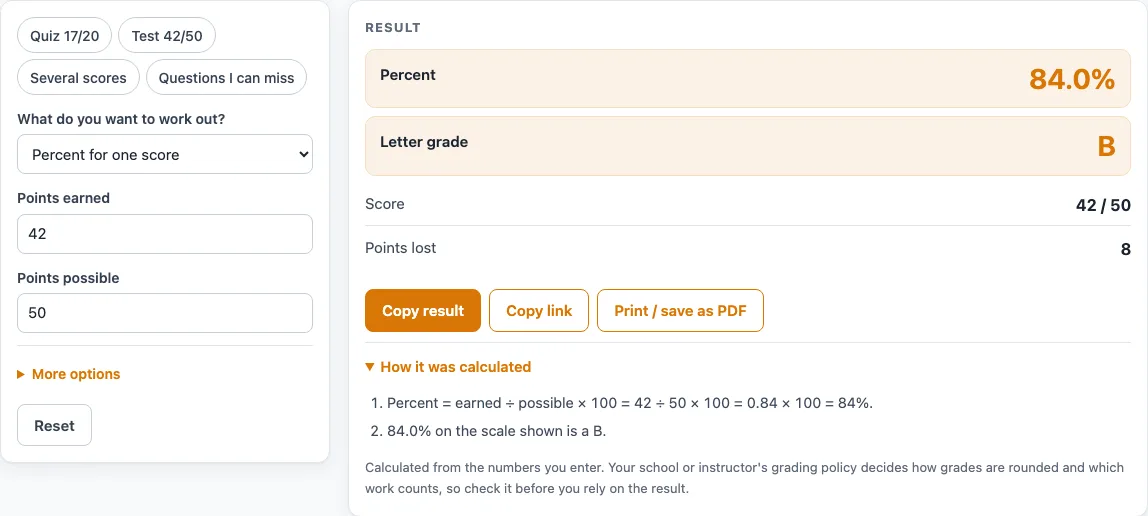
- Read the “Percent” and “Letter grade”. The page also shows the score and “Points lost”. The default example, 42 of 50, gives 84% and 8 points lost.
- For several scores, type one score per line in “Scores”. Use earned/possible, or earned, possible, or earned possible. You can enter up to 100 lines.
- The “Percent” is the points-weighted total. Also read “Mean of the percents”, “Number of scores” and “Lowest to highest”. A table lists each score.
- If the total and the mean of the percents differ, the page warns you. Ask your teacher which one they use.
- For missed questions, enter the “Number of questions on the test” (a whole number from 1 to 1000) and the “Grade you want (%)”.
- Read “Most questions you can miss” and the table of missed counts, correct answers, percent, letter and whether the target is met.
- Under More options, change the “Letter-grade scale” or “Show percents rounded to” if you need to, and check the results again.
Scores are typed in your browser and written into the page address. Do not type student names into the page.
How is a test score percent calculated?
A test score percent is the points earned divided by the points possible, multiplied by 100. For example, 42 points out of 50 is 42 ÷ 50 = 0.84, and 0.84 × 100 = 84%. The letter grade uses the unrounded percent, and display rounding only changes what you see on the page.
When you enter several scores, the tool can compute two averages, and they are not always the same. The total adds all points earned and divides by all points possible. The mean of the percents averages each score’s percent with equal weight. The default list shows the difference: 18/20, 40/50, and 7/10 give 65 ÷ 80 = 81.25% by total points, while the mean of 90%, 80%, and 70% is 80%. The gap appears because the tests have different point values. A test worth 50 points counts more in the total than a quiz worth 10 points. The page warns when the two numbers differ, so you can check which one your teacher uses.
A score above the points possible is accepted and used as typed, and the page shows an extra credit warning. Points possible must be above zero, and negative points are an error.
How many questions can you miss and still reach a target?
With equal-value questions, the fewest correct answers you need is the target percent times the number of questions, divided by 100, rounded up. The most you can miss is the number of questions minus that number. This is the ceiling rule, and it uses plain arithmetic.
For example, take 25 questions and a target of 90%. Then 25 × 90 ÷ 100 = 22.5, which rounds up to 23 correct answers. That means at most 2 can be missed, and 23 ÷ 25 = 92%. For 20 questions at 85%, the fewest correct is 17, so 3 can be missed. For 40 questions at 80%, the fewest correct is 32, so 8 can be missed.
If even a perfect score is below the target, the page says none and gives a warning. A target over 100% also triggers a warning about extra credit. The table shows missed counts from 0 up to a few past the limit, never beyond 12 missed.
Worked examples
| Input | Result |
|---|---|
| 42 out of 50 points | 84.0%, letter B |
| 17 out of 20 points | 85.0%, letter B |
| 3 scores | 81.3%, letter B |
| 25 questions, want 90% | Can miss 2 |
| 40 questions, want 80% | Can miss 8 |
Calculated by the tool above; open it with the same values to see each step.
Frequently asked questions
Is this the same as a grade percentage calculator?
Yes. Both use earned ÷ possible × 100 for each score. This page also handles several scores and the missed-questions check.
Why do the total score and the mean of the percents differ?
The total score weights each score by its points possible. The mean of the percents gives each score the same weight. When tests have different point values, the two numbers can be different, so the page shows both.
Can I enter more points earned than points possible?
Yes. A score above the points possible is accepted and used as typed, and the page shows an extra credit warning.
Which letter scale does the tool use?
The default letter scales are common US examples. Plain A is 90, B is 80, C is 70, and D is 60. You can also choose a scale with plus and minus grades.
Can I use this as an assignment grade calculator?
Yes. Enter the points earned and points possible for the assignment, and the page calculates the percent. Use the several-scores mode to combine multiple assignments.
Is anything I type saved or sent anywhere?
Everything runs in your browser. Scores are written into the page address, but nothing is uploaded, and you do not need to sign up.
Related tools
- Final Grade Calculator: Use it when you want to estimate a final grade from your course scores.
- Weighted Grade Calculator: Use it when categories such as tests and homework count for different shares of the grade.
- Report Card Comments: Use it when you need a set of general comment wording for a report card.
- Kindergarten Report Card Comments: Use it when you are writing report card comments for kindergarten.
- End of Year Report Card Comments: Use it when you are writing end-of-year comments.
- Report Card Template: Use it when you want a blank layout to fill in for report cards.