Weekly Lesson Plan Template
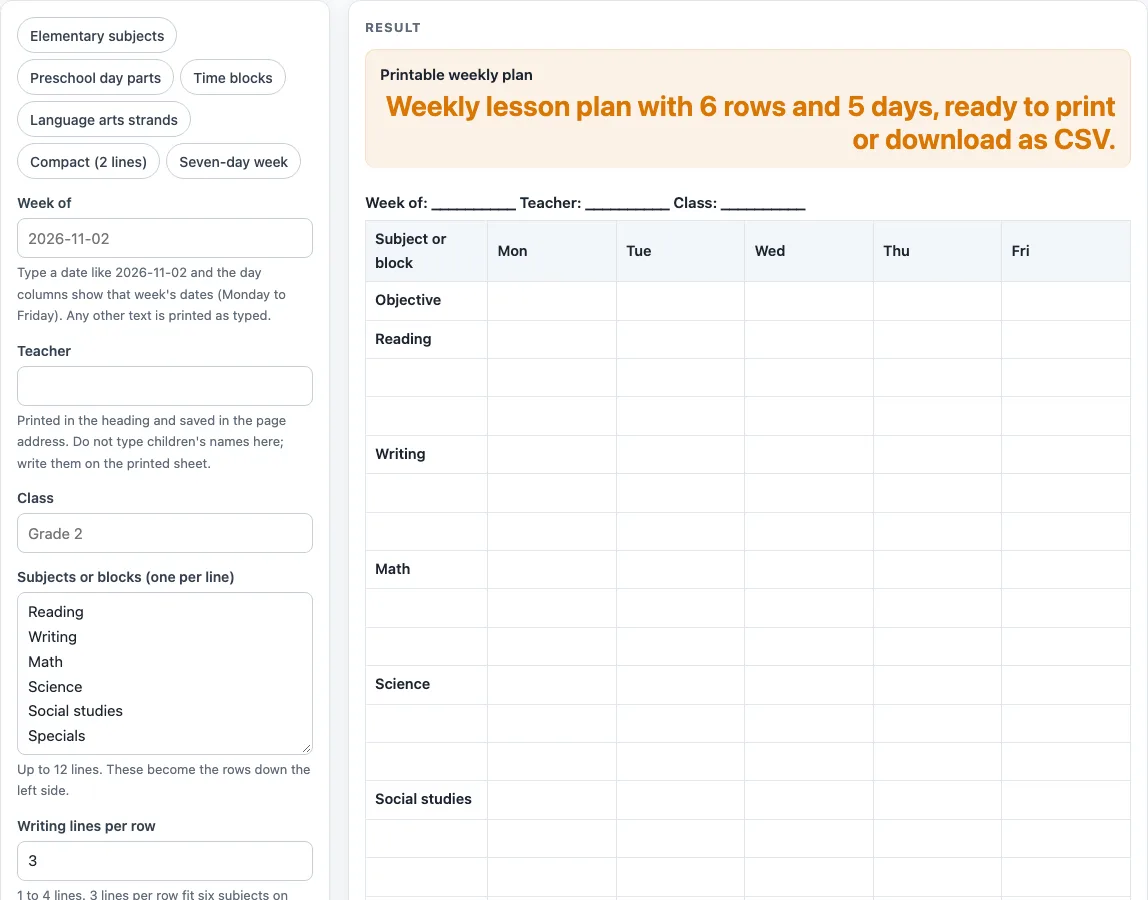
Type the subjects or blocks you teach, pick the week, and print a Monday-to-Friday grid with room to write, including a preschool weekly plan version.
How to use the Weekly Lesson Plan Template
- In “Week of”, type a date in ISO format, such as 2026-11-02, or type any text. A real date fills the day columns with the dates of that week, starting from its Monday.
- Type your name in “Teacher” and the group name in “Class” if you want them in the heading.
- Choose a preset chip, or edit “Subjects or blocks (one per line)”. The default list is Reading, Writing, Math, Science, Social studies, and Specials.
- Set “Writing lines per row”. Enter a number from 1 to 4. The default is 3, and any number above 4 is cut to 4.
- Under More options, turn on “Add Saturday and Sunday” if your week includes those days. This adds Sat and Sun columns, for 8 columns in total.
- “Weekly objective row” and “Notes row at the bottom” are both on by default, which gives 20 rows in all. Turn either one off if you do not need it.
- Check the grid. More than 28 rows triggers a long-table warning, so cut back on subjects or lines.
- Print the page, or use the CSV download button to save the heading, columns, and rows as a .csv file for a spreadsheet.
The print view shows the heading and the bordered grid only. Typed text stays in the page address, so you can return to the same settings later.
What is a weekly lesson plan template for?
A weekly lesson plan template gives you one sheet for planning a full week. Each row is a subject or block, and each column is a day, so you can see the whole week at a glance. The grid is a general-purpose layout. It does not state a standard or requirement, and its default subject lists are a design choice you can change.
Each cell is empty when the sheet is blank, and the first column holds the subject or block names. You decide what goes in each cell. Presets give you a starting point. “Preschool day parts” lists Circle time, Learning centers, Small group, Outdoor play, Read-aloud, and Music and movement. “Time blocks” lists Morning work, Block 1, Block 2, Lunch and recess, Block 3 and Block 4. “Language arts strands” lists Phonics, Reading, Writing, Grammar, Spelling, and Vocabulary.
How do the dates and days fit into a weekly lesson plan?
The day columns follow the date you enter in “Week of”. A real ISO date sets the heading to the dates of that week, counting from its Monday. For example, 2026-11-04 is a Wednesday, so the grid shows Mon 11/02 to Fri 11/06. Dates roll over month, year, and February 29 correctly.
If you enter other text, such as “Week 3 of unit,” the text appears in the heading exactly as you typed it, and the columns stay plain Mon to Fri. Use this option when your weeks do not line up with calendar dates.
The Saturday and Sunday switch adds two more columns. The “Seven-day week” preset uses 2 writing lines and 8 columns, which suits programs that run every day. The “Compact” preset uses 2 lines, drops the Notes row, and gives 13 rows in all.
Your school or program may have its own planning requirements. This template is a general layout of our own design, so check what is required before you rely on it.
Worked examples
| Input | Result |
|---|---|
| 6 subjects or blocks, 3 lines each | 20 rows, 6 columns |
| 6 subjects or blocks, 3 lines each | 20 rows, 6 columns |
| 6 subjects or blocks, 3 lines each | 20 rows, 6 columns |
| 6 subjects or blocks, 2 lines each | 14 rows, 8 columns |
Calculated by the tool above; open it with the same values to see each step.
Frequently asked questions
Is this weekly lesson plan template free?
Yes. It is free to use, and it runs in your browser. Nothing you type is uploaded.
Do I need to create an account?
No. There is no sign-up. Open the page, change the settings, and print or save the result.
Can I enter a child’s name?
The page has no field for a child’s name. Use “Teacher” and “Class” for the names you need in the heading, and write children’s names on the printed sheet.
What happens if I enter more than 12 subjects?
The list is cut to the first 12 lines, and a warning appears. If you leave the list empty, you get an error instead, so add at least one subject or block.
Can I use this for a preschool weekly lesson plan?
Yes. Select the “Preschool day parts” preset to start with Circle time, Learning centers, Small group, Outdoor play, Read-aloud, and Music and movement. You can edit those lines to match your own day.
Is this an official lesson plan form?
No. It is a general layout of our own design and does not check any rules. Ask your school or program what it requires for lesson or activity plans.
Related tools
- Daily Lesson Plan Template: Use this when you want to plan a single day in more detail than a week allows.
- Kindergarten Lesson Plan Template: Use this for a lesson plan layout set up for kindergarten classrooms.
- Lesson Plan Template: Use this for a plan that covers one lesson rather than a full week.
- Preschool Lesson Plan Template: Use this for a lesson plan layout set up for preschool groups.
- Preschool Schedule: Use this to lay out the order of the day for a preschool group.
- Preschool Visual Schedule: Use this to build a picture-based daily schedule for preschool children.
- Teacher Lesson Plan Book: Use this to keep a longer, multi-week record of your lesson plans.